
Hi mates. Today we’re going to cover how to investigate and fix WAP Trust error Service Unavailable when you have more than one AD FS server in the farm configured with WID (Windows Internal Database).
Scenario
WAP servers: At least 1
AD FS servers: At least 2
Database: WID
Error
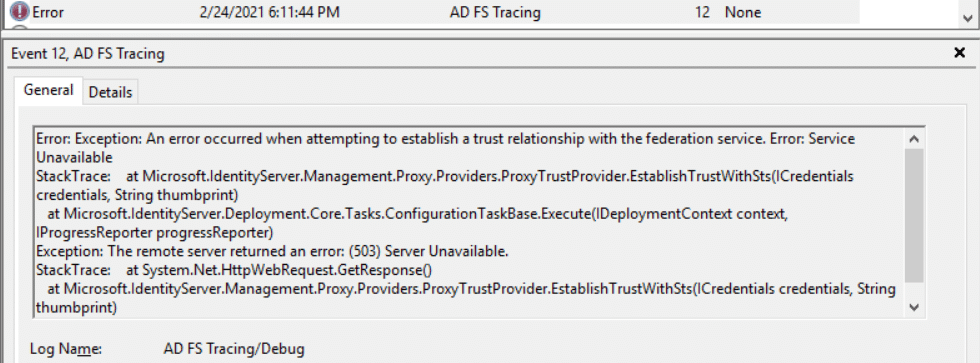
Error: An error occurred when attempting to establish a trust relationship with the federation service. Error: Service Unavailable.
Event Logs:
WAP server: AD FS Tracing/Debug
Log Name: AD FS Tracing/Debug
Source: AD FS Tracing
Date: 1/28/2021 11:24:29 AM
Event ID: 12
Task Category: None
Level: Error
Keywords: ADFSConfiguration
Description:
Error: Exception: An error occurred when attempting to establish a trust relationship with the federation service. Error: Service Unavailable
StackTrace: at Microsoft.IdentityServer.Management.Proxy.Providers.ProxyTrustProvider.EstablishTrustWithSts(ICredentials credentials, String thumbprint)
at Microsoft.IdentityServer.Deployment.Core.Tasks.ConfigurationTaskBase.Execute(IDeploymentContext context, IProgressReporter progressReporter)
Exception: The remote server returned an error: (503) Server Unavailable.
WAP server: AD FS Tracing/Debug
Log Name: AD FS Tracing/Debug
Source: AD FS Tracing
Event ID: 14
Task Category: None
Level: Information
Keywords: ADFSConfiguration
Description:
Result: Status – Error, Message – An error occurred while attempting to establish a trust relationship with the Federation Server. An error occurred when attempting to establish a trust relationship with the federation service. Error: Service Unavailable, Context – DeploymentTask
WAP server: AD FS Tracing/Debug
Log Name: AD FS Tracing/Debug
Source: AD FS Tracing
Event ID: 107
Task Category: None
Level: Error
Keywords: ADFSProxyConfiguration
Description:
ProxyServerRequestHandler.ProcessContext: WebException returned : Exception: Unable to connect to the remote server
StackTrace: at System.Net.HttpWebRequest.GetRequestStream(TransportContext& context)
at System.Net.HttpWebRequest.GetRequestStream()
at Microsoft.IdentityServer.Web.Proxy.PrimaryServerRequestHandler.ProcessContext(WrappedHttpListenerContext context, String authenticationAuditInformation)
System.Net.Sockets.SocketException: A connection attempt failed because the connected party did not properly respond after a period of time, or established connection failed because connected host has failed to respond X.X.X.X:80
ErrorCode: 10060
NativeErrorCode: 10060
StackTrace: at System.Net.Sockets.Socket.DoConnect(EndPoint endPointSnapshot, SocketAddress socketAddress)
at System.Net.ServicePoint.ConnectSocketInternal(Boolean connectFailure, Socket s4, Socket s6, Socket& socket, IPAddress& address, ConnectSocketState state, IAsyncResult asyncResult, Exception& exception)
Investigating the issue
Follow steps below to investigate the issue:
- Ping the federation service name from WAP server to see which AD FS server is receiving the request.
- If the name resolves to one of the secondary federation servers, check the replication status on this server running command below:
Get-AdfsSyncProperties
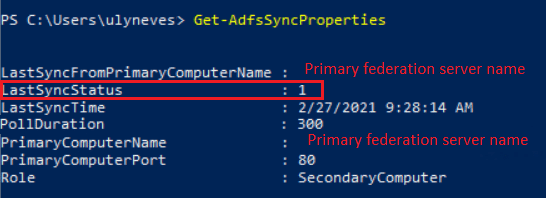
LastSyncStatus = 0 (Success)
LastSyncStatus = 1 (Failure)
In case you see LastSyncStatus = 1, the database replication is not working correctly.
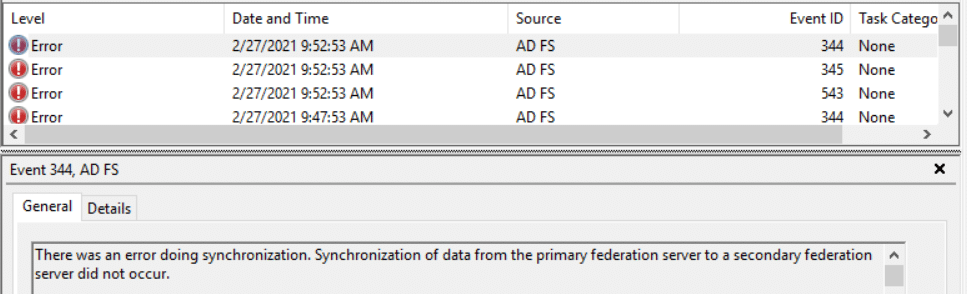
- If the request is served by a secondary AD FS server, go to the server and search for events 345, 543 and 344 in the AD FS Admin logs and event 107 in the AD FS Tracing/Debug log.
- Check if the secondary federation server is able to communicate to the primary using TCP port 80 with command below:
Test-NetConnection -ComputerName primaryADFSserver -Port 80
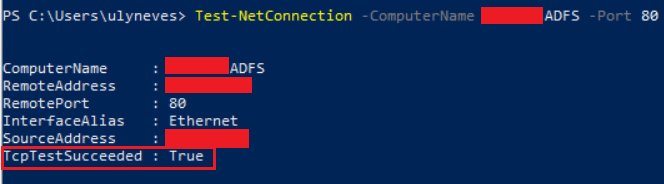
If the connection is not succeeded, fix the replication issue between secondary and primary federation servers and try to establish the trust again.
Workaround:
As a workaround to let you establish the trust, configure the WAP server to resolve federation name to the primary federation server and run the trust configuration again.
Summary
In this article, we covered how to investigate replication issues when failing to configure the trust between Web Application Proxy and AD FS servers.
I hope you have enjoyed reading this article and it helps you manage your AD FS environment.
Enjoyed the article? Like and share. 🙂
Note: I do not represent the organization I work for, all the opinions expressed here, are my own. This post is provided AS IS with no warranties or guarantees and confers no rights.
In case you have any suggestion or feedback, please leave a comment.
[ ]’s
Ulysses Neves

Hi Ulyssess,
Thanks for the troubleshooting steps, In my case the ADFS1 and ADFS2 are in sync no issues. but I have 2 WAP in which one of them has lost the trust as a result I can’t get the trust back online as I keep getting the error: Event 422
When I run the GUI or try to do it via PowerShell:
Error: An error occurred when trying to establish a trust relationship with the federation service. Error: Service Unavailable.
my AFDS log on that Proxy is:
A connection attempt failed because the connected party did not properly respond after a period of time, or established connection failed because connected host has failed to respond to port 443 <— appproxysvc is stopped
is there a way to connect to the WAP2 to re-create the trust? as of now the failed connection is attempted to connect to an IP which is biding to the WA1 which is currently not running due to the appproxysvc being down.
let me know if you are able to replicate this in your lab please?
Hello dude. Thanks for the feedback. I have a previous post related to error message Error: Service Unavailable, but being a generic message, other reasons can be the same error message. Please check this article and confirm if the endpoint is available: http://ulyssesneves.com/2021/06/18/ad-fs-troubleshooting-wap-trust-error-the-remote-server-returned-an-error-503-server-unavailable/
This public document have more information on AD FS farm network requirements which you can use to confirm if you have proper communication: https://docs.microsoft.com/en-us/windows-server/identity/ad-fs/deployment/best-practices-securing-ad-fs#wap-and-federation-servers
This document gives you more information in how to recover the WAP trust: https://docs.microsoft.com/en-us/powershell/module/webapplicationproxy/install-webapplicationproxy?view=windowsserver2019-ps#example-1–configure-web-application-proxy-on-the-server
In case you followed the requirements in the documents above and still have issues, open a ticket with Microsoft to go deeper in the investigation.