Greetings, readers. In this article, we will delve into the process of investigating and resolving the message “LogoncertTemplateReady: NO (StateNoTemplate)” that may surface during Windows Hello for Business (WHfB) Hybrid Certificate trust deployments. If you are unfamiliar with this deployment model, I recommend consulting the relevant Microsoft document.
WHfB deployments demand meticulous configuration of the Public Key Infrastructure (PKI). Any oversight in these configurations may impede the provisioning process. Consequently, it is imperative to adhere to specific guidelines to ensure a seamless setup.
Throughout this article, we aim to shed light on a prevalent issue encountered in WHfB Certificate Trust deployments. When this issue arises, the client fails to initiate the WHfB setup, resulting in the aforementioned message.
ERROR MESSAGE
Admins might find the message below on the Ngc Prerequisite Check after running ‘dsregcmd /status’ command on the client machine:
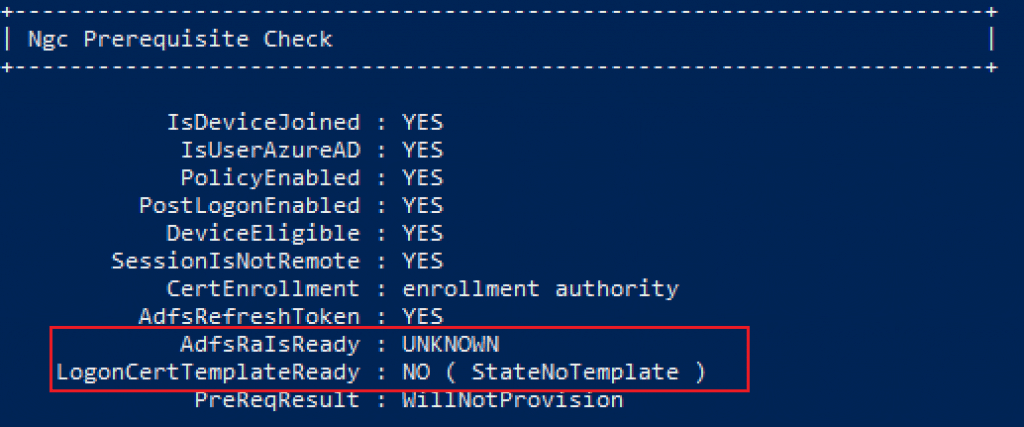
AdfsRaIsReady: UNKNOWN
LogonCertTemplateReady: NO ( StateNoTemplate )
As per Microsoft documentation, Verification processes are conducted for both AdfsRaIsReady and LogonCertTemplateReady when configuring the Windows Hello for Business Certificate Trust model. For detailed information on these parameters, please refer to the following section:
- AdfsRaIsReady: This setting is specific to WHFB Certificate Trust deployment and present only if the CertEnrollment state is enrollment authority. Set the state to YES if AD FS indicates in discovery metadata that it supports WHFB and the logon certificate template is available.
- LogonCertTemplateReady: This setting is specific to WHFB Certificate Trust deployment and present only if the CertEnrollment state is enrollment authority. Set the state to YES if the state of the login certificate template is valid and helps troubleshoot the AD FS Registration Authority (RA).
INVESTIGATING THE ISSUE
The initial step in addressing a failed provisioning within a Windows Hello for Business (WHfB) setup is to conduct a thorough investigation to ensure that all stipulated requirements are meticulously met, as outlined in the official guidelines. Please check this link if you need dmore information Microsoft document.
Upon verification of the presence of all necessary requirements, several tools are available to provide insights into any missing prerequisites that may hinder the initiation of WHfB enrollment:
Event viewer:
- Microsoft » Windows » User Device Registration » Admin
- Microsoft » Windows » HelloforBusiness » Operational
Obs: In the User Device Registration event logs, refer to event ID 362 as ‘Windows Hello for Business provisioning will not be launched’ and event ID 358 as ‘Windows Hello for Business provisioning will be launched’.
In the Microsoft-Windows-HelloforBusiness/Operational log, we find the error message with ID 7205: Windows Hello for Business failed to locate a usable sign-in certificate template.
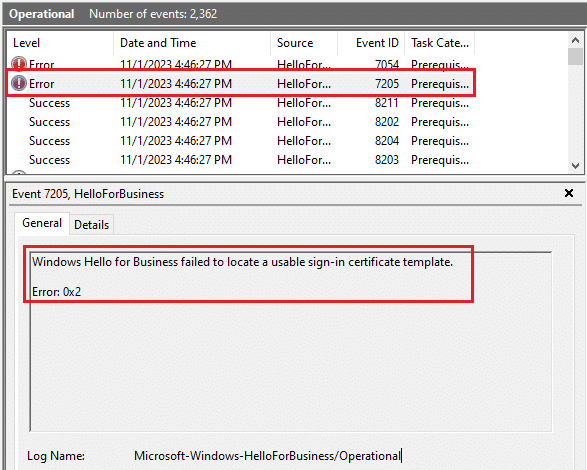
The error above gives us hints that something is missing in the WHfB certificate template.
To check if the WHfB certificate template has been properly tagged as Windows Hello Sign-in template, open a command prompt with admin privileges in the Windows server holding the certificate authority role and run the command below:
certutil.exe -dsTemplate -v WHFBAuthentication
Check if the ‘CTPRIVATEKEY_FLAG_HELLO_LOGON_KEY’ is inside parenthesis ‘()’, as below:
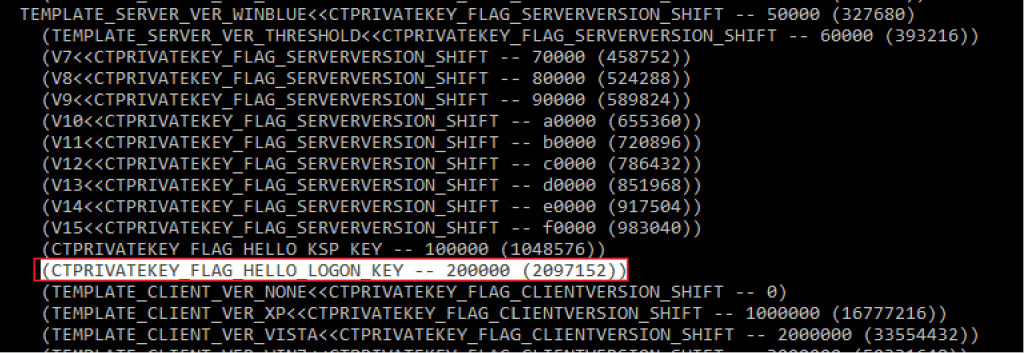
If Yes, run the command below to set the configuration properly:
certutil.exe -dsTemplate WHFBAuthentication msPKI-Private-Key-Flag +CTPRIVATEKEY_FLAG_HELLO_LOGON_KEY
If the command above was effective, you have to find the new output as below, the ‘CTPRIVATEKEY_FLAG_HELLO_LOGON_KEY’ is outside parenthesis ‘()’.
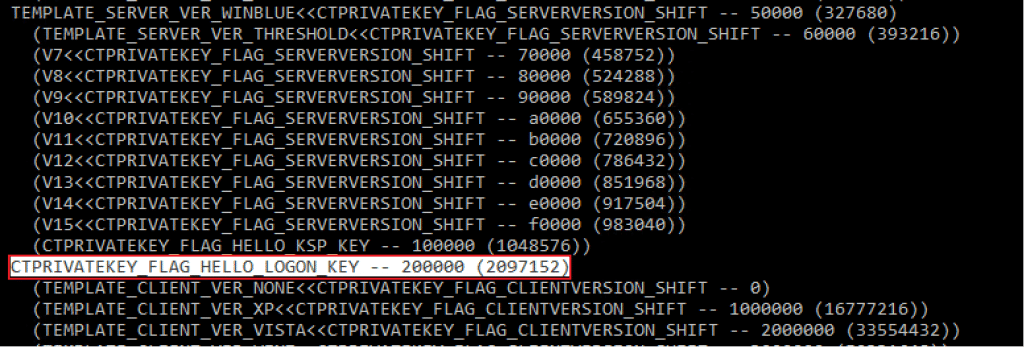
Note: In case you face any issues related with the WHfB templates, recommend double-checking the steps followed in the PKI configuration published in this document: https://learn.microsoft.com/en-us/windows/security/identity-protection/hello-for-business/hello-hybrid-cert-trust-validate-pki#mark-the-template-as-the-windows-hello-sign-in-template
In order to verify the modifications in the Ngc Prerequisite Check for the parameters AdfsRaIsReady and LogonCertTemplateReady, I interrupted the PIN setup process and executed the command ‘dsregcmd /status’ on the impacted client. Subsequently, the status has been observed to have undergone the following changes:
AdfsRaIsReady : YES
LogonCertTemplateReady : StateReady
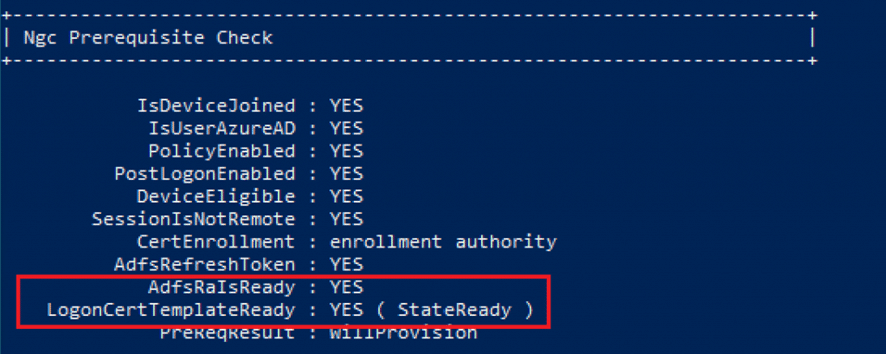
That means the user now has all requirements in place and PreReqResult changed from WillNotProvision to WillProvision.
Checking the CA, we can see the WHfB Authentication certificate issued to User1 successfully.

In the client, we can confirm the Smart Card Logon certificate generated by template ‘WHFB Authentication’ is present in the user’s personal store.

Summary
In this article, we covered how to investigate and fix the error ‘LogoncertTemplateReady: NO (StateNoTemplate)’ during Windows Hello for Business Hybrid Certificate trust deployment.
I hope you have enjoyed reading this article, and it helps you manage your Windows Hello for Business environment.
Enjoyed the article? Like and share. 🙂
Note: I do not represent the organization I work for, all the opinions expressed here, are my own. This post is provided AS IS with no warranties or guarantees and confers no rights. Always validate the solution in a test environment before deploying it into production.
In case you have any suggestion or feedback, please leave a comment.
[ ]’s
Ulysses Neves
