Hello everyone!
A document appears in Copilot for an employee who is not part of the document owner’s intended audience. Before assuming Copilot bypassed security, ask a simpler question: who already had permission to access it?
Microsoft documents that Copilot respects existing permissions. But those permissions may be broader than the content owner intended.
reference: (Microsoft 365 Copilot data protection).
The Sites and files shared via special SharePoint groups report helps administrators investigate access granted through Everyone except external users (EEEU) and Everyone. Microsoft referenced this reporting capability in recent Microsoft 365 Copilot release communications, while the report itself is documented as part of SharePoint Advanced Management.
reference: (special SharePoint groups permissions report) and (Microsoft 365 Copilot release notes).
Scope: This is a documentation-based walkthrough with original conceptual visuals. No report was executed for this article. Examples are fictional; no customer, production, or internal Microsoft content is included.
1. Confirm the prerequisites first
This is a SharePoint Advanced Management snapshot report, not the similarly named recent-activity report.
Before starting, confirm:
- Licensing: an eligible base subscription (for example Microsoft 365 E3/E5 or Office 365 E3/E5). These snapshot reports are a SharePoint Advanced Management capability, and that entitlement comes from assigning at least one Microsoft Copilot license, from the SharePoint Advanced Management Plan 1 add-on (with SharePoint K, P1 or P2), or from Microsoft 365 E7. A base subscription such as E5 on its own does not include this entitlement.
- Role: the detailed report requires the SharePoint Advanced Management Administrator role (Microsoft documentation sometimes shortens this to SharePoint Advanced Admin), assigned by a Global Administrator.
- Baseline: generate the Site permissions across your organization report at least once. Its first run can take up to five days.
Do not promise a same-day demonstration if that baseline has not been generated.
reference: (SharePoint Advanced Management prerequisites), (data access governance reports) and (site permissions report).
2. Run the correct report
In the SharePoint admin center:
- Open Reports → Data access governance.
- Under Snapshot reports, locate Sites and files shared via special SharePoint groups.
- Select View reports.
- Select Run report for either Everyone except external users or Everyone.
- Wait for Report available, then select Download report.
Each group has its own report. The download contains a CSV inside a ZIP file.
Protect the export: it contains file paths, URLs, identifiers and permission information. Keep it in an approved location rather than attaching an unredacted copy to a public article.
reference: (how to run the report).
3. Follow the permission path
Start with these columns:
| Column | Question it answers |
|---|---|
| ItemType / Item Url | Which site, list, folder or file is affected? |
| Recipient | Is the permission granted to EEEU or Everyone? |
| Role definition | What access is granted: Read, Edit or another role? |
| ParentGroupName / ParentGroupType | Is access provided indirectly through a group? |
| ReportDate | When was the report generated? |
For example, EEEU might receive Read access directly to one file, or be included in a SharePoint Visitors group that has access to a site. Those paths require different remediation decisions.
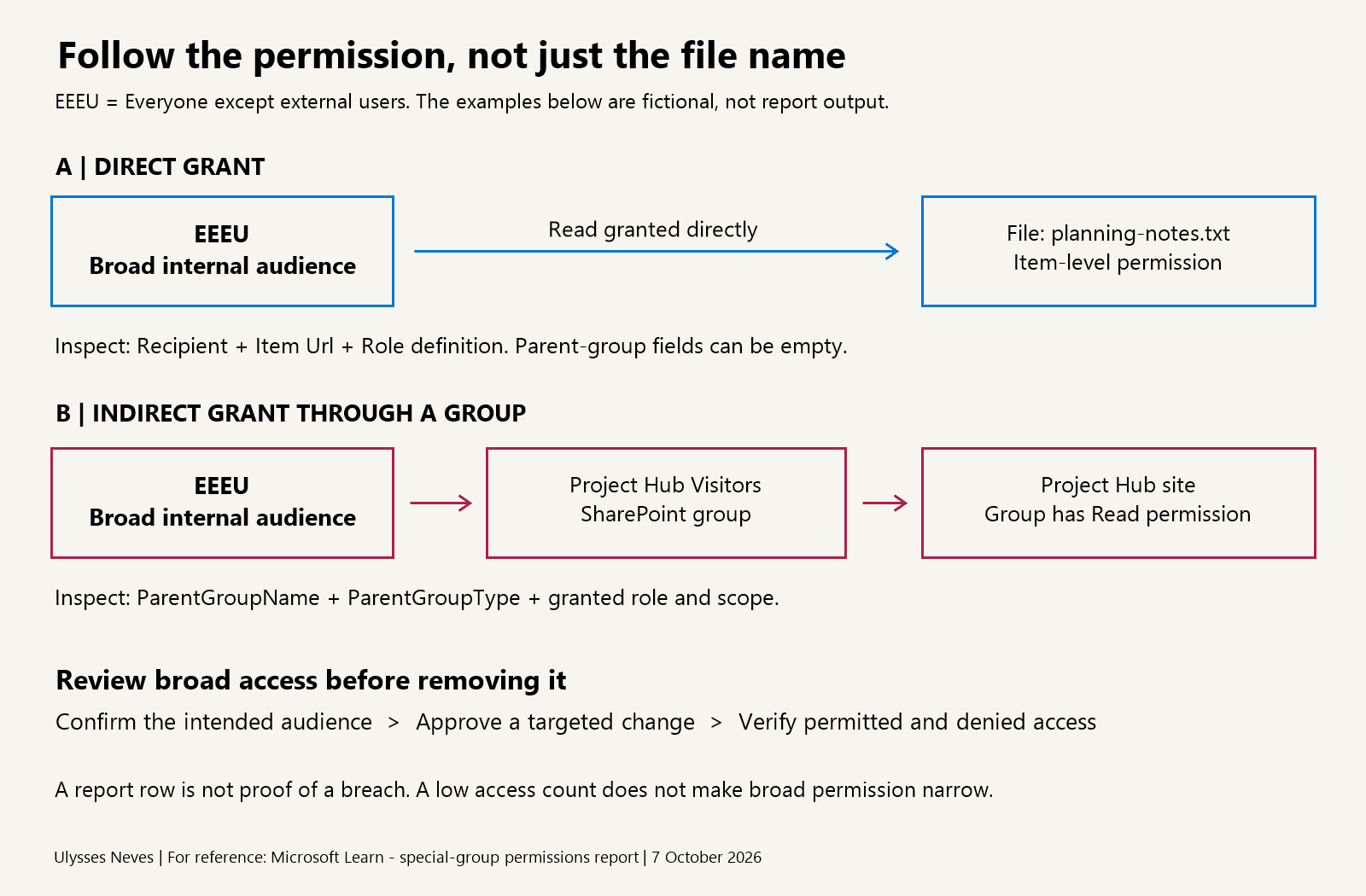
Do not confuse permission scope with observed usage. Microsoft defines TotalUserCount as the number of users who accessed the item at least once. A low count may indicate limited observed access so far, but the permission itself can still allow access to all internal users or everyone, depending on how the item is shared.
reference: (report columns and TotalUserCount).
4. Confirm intent before removing access
A report row is a review signal, not proof of a breach or incorrect sharing.
An employee handbook may legitimately need a broad internal audience. A project’s working documents may not.
For each finding:
- Confirm the intended audience with the content owner.
- Identify the actual permission or group membership providing broad access.
- Assess which users and workflows would be affected.
- Approve a targeted change and record the previous configuration.
- Confirm intended users retain access and unintended users no longer have it.
Avoid blanket removal of broad groups across the tenant. Microsoft’s guidance recommends considering content sensitivity and disruption, and identifies site access reviews as a collaborative remediation option.
reference: (remedial actions from data access governance reports).
5. Understand what the report cannot prove
| Limitation | Practical consequence |
|---|---|
| Data can be up to 48 hours old | Do not treat it as a live permission check. |
| Reports can be rerun every 30 days | Plan direct access validation after remediation. |
| Output covers SharePoint and OneDrive together | It cannot be scoped to only one workload. |
| Export is limited to one million rows | Consider coverage before treating an export as exhaustive. |
| System files and system groups are excluded | An empty report does not prove every possible broad permission is absent. |
reference: (report prerequisites and limits).
Final takeaway
Copilot only surfaces content users already have permission to access, but broad permissions may expose content beyond the audience the content owner originally intended. Copilot respecting permissions and those permissions being appropriate are two different things.
Use the report to find the item, trace how access was granted, confirm the intended audience, and remediate deliberately. The goal is not to remove every broad permission; it is to remove unintended broad access without breaking legitimate collaboration.
Information current as of October 7, 2026. Confirm current licensing, availability and reporting limits before implementation.