Identity Admin Weekly · Episode 2 — Microsoft Security
Editorial scope: This is a documentation-based explainer, not a report of a completed lab.
Hello everyone. Imagine an Active Directory incident reaches the SOC. The alert names a domain, but the first questions are broader: Are all domain controllers monitored? Which identities are sensitive? Are the domain policies exposing avoidable risk? What trusts extend the investigation?
Microsoft made the Domain investigation page generally available in July 2026. The useful change is not another dashboard by itself. It is a domain-level view that brings health, coverage, identities, policies, recommendations, trusts, incidents, groups, and computers into one investigation path.
By the end of this article, you will know how to read that page as a sequence of operational questions—and where the current documentation sets important boundaries.
What changed, and why it matters
The feature appeared as a preview in Microsoft Defender XDR’s March 2026 identity security enhancements. Microsoft then listed the Domain investigation page as generally available in July 2026 in both the Defender XDR and Defender for Identity release notes.
That distinction matters. A roadmap item or preview announcement would not prove general availability. The July release notes do.
Microsoft describes the page as a consolidated view for an on-premises Active Directory domain. It includes domain properties, deployment health, an identity summary, service accounts, sensitive entities, active recommendations, Group Policy Objects, and trust relationships. Separate tabs add incidents and alerts, security policies, groups, and computers.
The outcome is a better investigation starting point: before treating an alert as an isolated event, an administrator or analyst can review the condition and exposure of the domain around it.
Scenario: an alert is the entry point, not the whole investigation
Suppose an incident references CONTOSO.COM. The alert provides the immediate detection context, but it does not answer every domain-level question.
A structured review should move through six questions:
- Is Defender for Identity observing the whole domain?
- Which identities and assets deserve the most attention?
- Do the visible security policies show risky configuration?
- Which trust relationships expand the possible scope?
- Which recommendations explain known posture gaps?
- Which other incidents and alerts are already connected to the domain?
The Domain investigation page organizes those questions without requiring you to assemble the initial picture from unrelated screens.
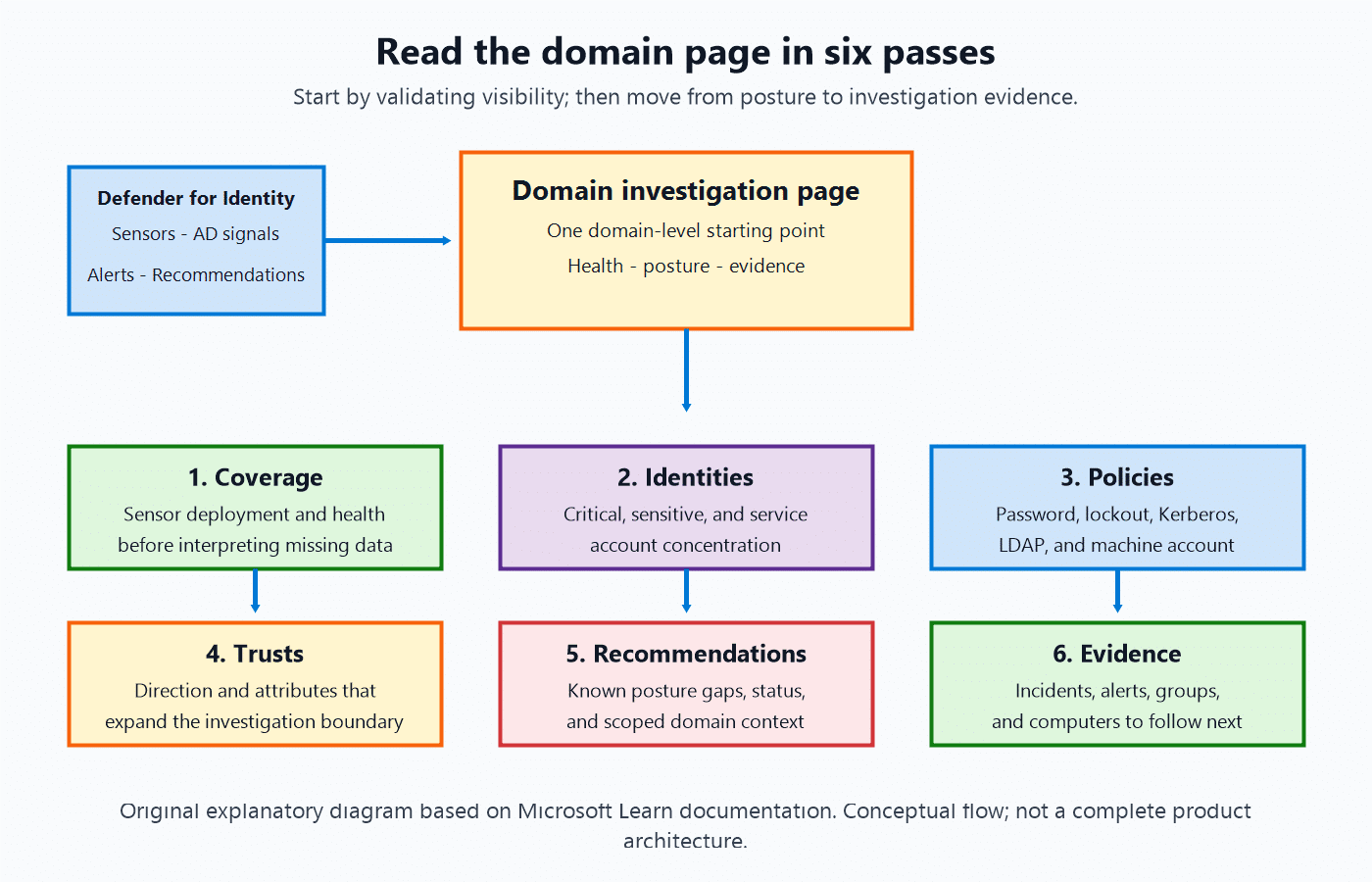
The diagram starts with Defender for Identity signals entering the domain-level view. The first pass validates sensor coverage; the next four add identity, policy, trust, and recommendation context; the final pass follows incidents, alerts, groups, and computers as investigation evidence.
Prerequisites and access boundaries
Microsoft documents these prerequisites:
- A Microsoft Defender for Identity license, or another license that includes Defender for Identity, such as E5.
- A user role with at least Security Reader permissions.
Microsoft’s licensing FAQ states that Defender for Identity is available through EMS E5 and as a standalone license, and points customers to the current licensing guidance for per-user requirements.
Microsoft also recommends least-privilege access through role groups or Microsoft Defender XDR Unified RBAC. For scoped users, the domain page can limit recommendation context to the domains included in their assigned scope.
Lab limitation: I have not validated this experience in a Defender for Identity tenant. Azure subscription and Microsoft Entra ID P2 access alone do not establish Defender for Identity entitlement, deployment, sensor coverage, or permission to use a production Active Directory environment.
Read the page in six passes
1. Start with coverage before interpreting absence
Open the Overview tab and inspect Deployment Health first. Microsoft defines 100% coverage as sensors being deployed on all domain controllers. Selecting a deployment issue takes you to sensor deployment settings.
This is the first control question because missing observations and healthy observations are not the same thing. If coverage is incomplete, the page may still be useful, but you should not interpret a quiet view as proof that every domain controller is being monitored.
Also review the overall Health Score. Microsoft documents the displayed levels as Low, Medium, or High, based on identity infrastructure coverage, sensor health, and active recommendations. The How to fix path opens recommended actions.
Important boundary: 100% deployment coverage describes sensor deployment across domain controllers. It does not mean the domain has no active recommendations, weak policies, sensitive identities, or open incidents.
2. Identify concentration of identity risk
Next, use the identity summary rather than beginning with a flat object list.
The Overview tab shows:
- all domain identities, including counts classified as Critical or Sensitive;
- service accounts grouped as sMSA, gMSA, or user accounts;
- sensitive identities, groups, and computers;
- links that open filtered identity or service-account views.
This gives the investigation a prioritization layer. A domain with sensitive entities or user-based service accounts deserves a different reading from one where the visible identity concentration is lower.
The page does not, by itself, prove compromise. It helps you decide what should be examined first.
3. Translate policy names into visible controls
The Security Policies tab presents human-readable summaries in four cards:
- Password Policy
- Account Lockout Policy
- Kerberos Policy
- LDAP & Machine Account
The documented fields include password age and history, lockout duration and threshold, Kerberos ticket age and renewal age, LDAP signing policy, and machine account quota.
This is valuable during support and investigation work because it connects the domain view to recognizable configuration controls. If insecure configurations have active recommendations, Microsoft documents that a warning banner links to those recommendations.
Treat this as a review surface, not an instruction to change policy during an incident. Remediation still requires change control, impact assessment, and testing appropriate to the environment.
4. Expand the boundary through trusts
The Trusts tab lists the trusted domain, trust direction, and trust attributes. Microsoft gives Inbound, Outbound, and Bidirectional as direction examples.
That makes trusts an investigation boundary question:
- Does another domain trust this one?
- Does this domain trust another?
- Is the relationship bidirectional?
- Do the listed attributes require deeper review?
The page provides the relationship inventory and supports export. It does not replace a full trust-security assessment, nor does the cited documentation prescribe a universal remediation for every trust type.
5. Connect posture recommendations to the domain
The Overview tab lists active recommendations that affect the health score. The Security recommendations tab adds recommendation status and last synchronization time.
Microsoft marks the scoped-user recommendations experience as Preview, even though the Domain investigation page itself is generally available. Keep those release states separate:
- Domain investigation page: Generally available in July 2026.
- Security recommendations for scoped users: Preview in the current feature documentation.
For scoped roles, Microsoft says the page shows recommendations for the domains included in the assigned scope. This supports domain-level context without automatically granting broader visibility.
6. Correlate with incidents, alerts, groups, and computers
The Incidents and alerts tab defaults to New and In progress incidents with High, Medium, or Low alert severity. It supports export, refresh, copied list links, and customizable columns.
One documented limitation is easy to miss:
“Data on this tab includes only incidents and alerts created on or after February 1, 2026.”
That date boundary means the tab should not be used as a complete historical incident archive.
The Groups and Computers tabs then let you examine domain objects and mark groups or computer accounts as sensitive. Microsoft connects that classification to exposure analysis and potential attack-path detection.
A practical troubleshooting order
If the page does not show what you expect, keep the checks evidence-based:
- Confirm that the environment has Defender for Identity licensing; Microsoft Entra ID P2 by itself is not listed as the prerequisite.
- Confirm that the signed-in user has at least the documented read access, or the appropriate Unified RBAC assignment.
- Use one of Microsoft’s documented entry points: the protected-domains widget, identity inventory, a domain-related alert or incident, or global search.
- Check Deployment Health and sensor coverage before drawing conclusions from missing domain data.
- Confirm whether the item is part of the generally available page or the preview scoped-recommendations experience.
- Remember the February 1, 2026 incident-and-alert date boundary.
Document not found: the cited sources do not provide a guaranteed universal refresh interval for every card and tab. This article therefore does not invent a synchronization SLA or advise waiting a specific number of minutes.
What this page can—and cannot—tell you
The Domain investigation page can consolidate the first domain-level questions:
- monitoring coverage and sensor health;
- identity and service-account concentration;
- sensitive entities;
- selected security-policy values;
- active recommendations;
- trust relationships;
- related incidents, alerts, groups, and computers.
It cannot turn a low-noise view into proof of safety, make incomplete sensor coverage complete, remove the need for least-privilege access, or replace testing and change control for remediation.
Conclusion
The strongest way to use Domain investigation is not to read every card in arbitrary order. Start with visibility, move to identity concentration, review policy and trust boundaries, connect recommendations, and then correlate incidents and assets.
That sequence turns a new page into a repeatable investigation habit:
Can I trust the coverage? → What matters most? → Which controls and relationships shape the risk? → What evidence should I follow next?
Which of these six passes would save your team the most time during an identity investigation—and which domain-level signal is still missing from your current workflow?
Original Microsoft sources
- What’s new in Microsoft Defender XDR — July 2026
- What’s new in Microsoft Defender for Identity — July 2026
- Investigate an Active Directory domain
- Role groups and Unified RBAC for Microsoft Defender for Identity
- Microsoft Defender for Identity frequently asked questions — licensing and privacy
Disclaimer: The views expressed here are personal and do not represent my employer. This article explains Microsoft’s published guidance and does not claim hands-on validation. Review current documentation, licensing, permissions, and change-control requirements before using the feature or changing a production environment.
[ ]’s Ulysses Neves
