Skip to content

Ulysses Neves

Microsoft Entra ID, authentication, and hybrid identity troubleshooting.

Menu
  • Home
  • Microsoft Azure
  • Microsoft AD FS
  • Microsoft 365
  • Contact
  • Troubleshooting Index
Menu
Microsoft Entra ID SMS and voice retirement: an admin preparation checklist. Inventory, passkeys and recovery.

Microsoft Entra SMS and Voice Retirement: An Admin Preparation Checklist

Posted on September 24, 2026

Hello everyone!

Microsoft is retiring Microsoft-provided SMS and voice authentication delivery in Microsoft Entra ID. For administrators, preparation should begin with understanding user dependencies—not immediately disabling those methods.

This guide highlights three areas to review: authentication methods, passkey registration, and password recovery.

About this walkthrough: Screenshots come from a dedicated non-production tenant containing synthetic test accounts and lab data only. Tenant and account identifiers have been cropped out. No internal Microsoft, customer, or production content is included. No settings were changed during capture.

What changes—and when?

Microsoft’s published public-cloud timeline separates the migration experience from retirement:

DateWhat changes
1 September 2026Automatic passkey enablement and registration nudges begin for users enabled for SMS or voice.
1 February 2027Microsoft-provided SMS/voice retire for users other than Global Administrators and external users. Internal guests are included in February.
1 July 2027Retirement applies to Global Administrators and external users.

Microsoft also documents a customer-managed telecom continuation path for organizations with justified requirements. See the retirement guidance and FAQ.

Do not confuse the different requirements

RequirementWhat it controls
Mandatory MFAWhether access to a particular service or operation requires MFA.
Authentication strengthWhich authentication methods satisfy the access policy.
Registration campaignPrompts eligible users to register another method.
SMS/voice retirementEnds Microsoft’s native telecom delivery for the applicable population.

These controls can apply together. Requiring MFA is not automatically the same as requiring phishing-resistant MFA—or retiring SMS.

References: Azure mandatory MFA and authentication strengths.

1. Find who depends on SMS or voice

Open: Entra ID → Authentication methods → Policies.
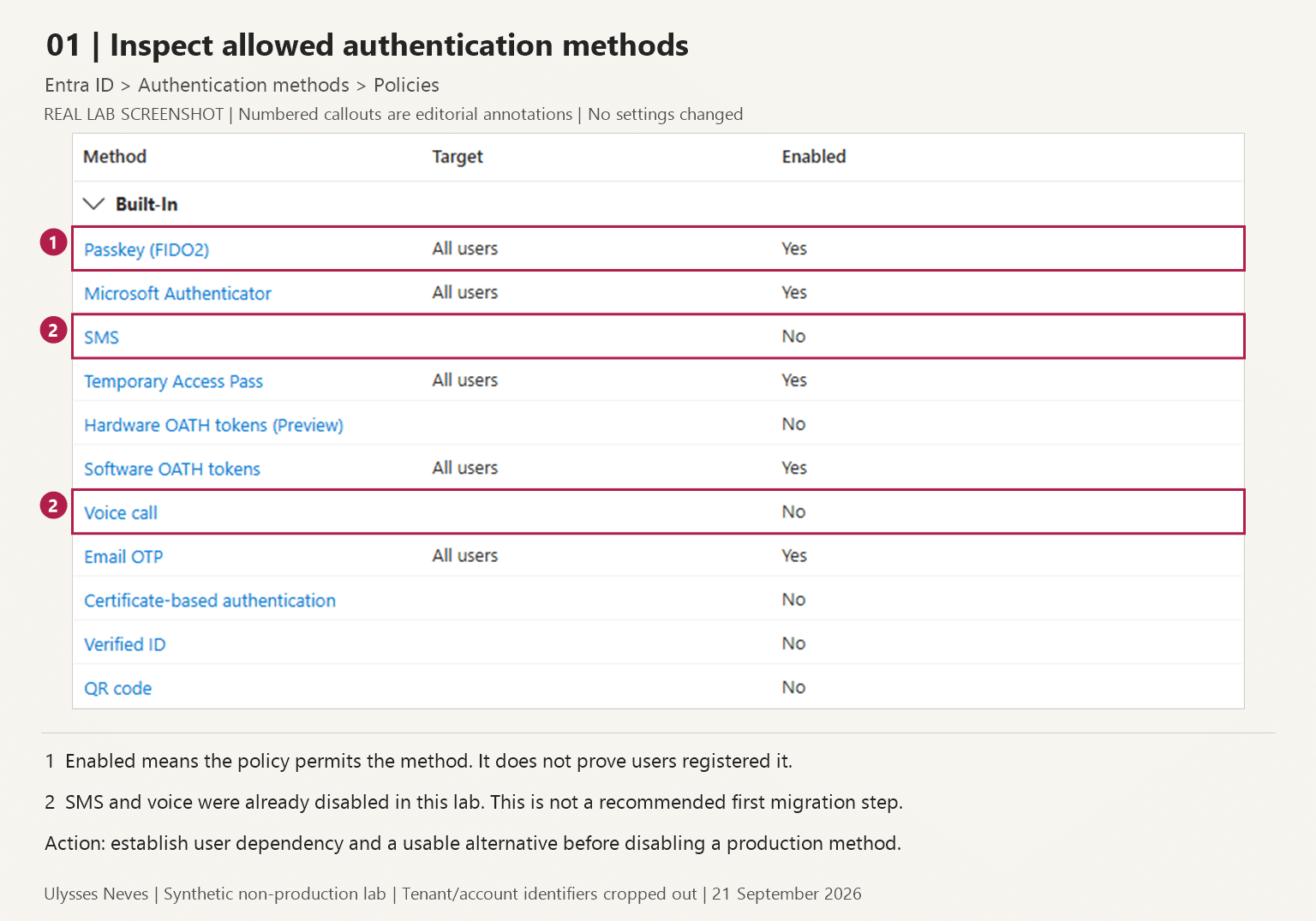
Authentication-method policy in a synthetic lab, highlighting passkeys, SMS and voice.
Figure 1. Inspect method availability and scope before planning changes.

Review SMS and Voice call targeting. Then inspect Activity → Registration, Activity → Usage, and User registration details.

Identify users who depend on telecom methods and do not have a usable alternative.

Enabled does not mean registered. Registered does not prove successful use. Reporting can also lag, so zero recent SMS activity does not prove zero dependency.

SMS and voice were already disabled in this lab. Do not copy those settings as your first migration step.

Sources: Method policies and registration and usage reporting.

2. Prepare passkeys before prompting users

Open: Authentication methods → Policies → Passkey (FIDO2).

Review targeting, Allow self-service set-up, and passkey profiles. Plan a representative pilot rather than copying the lab’s broad scope.

Next, open Registration campaign.
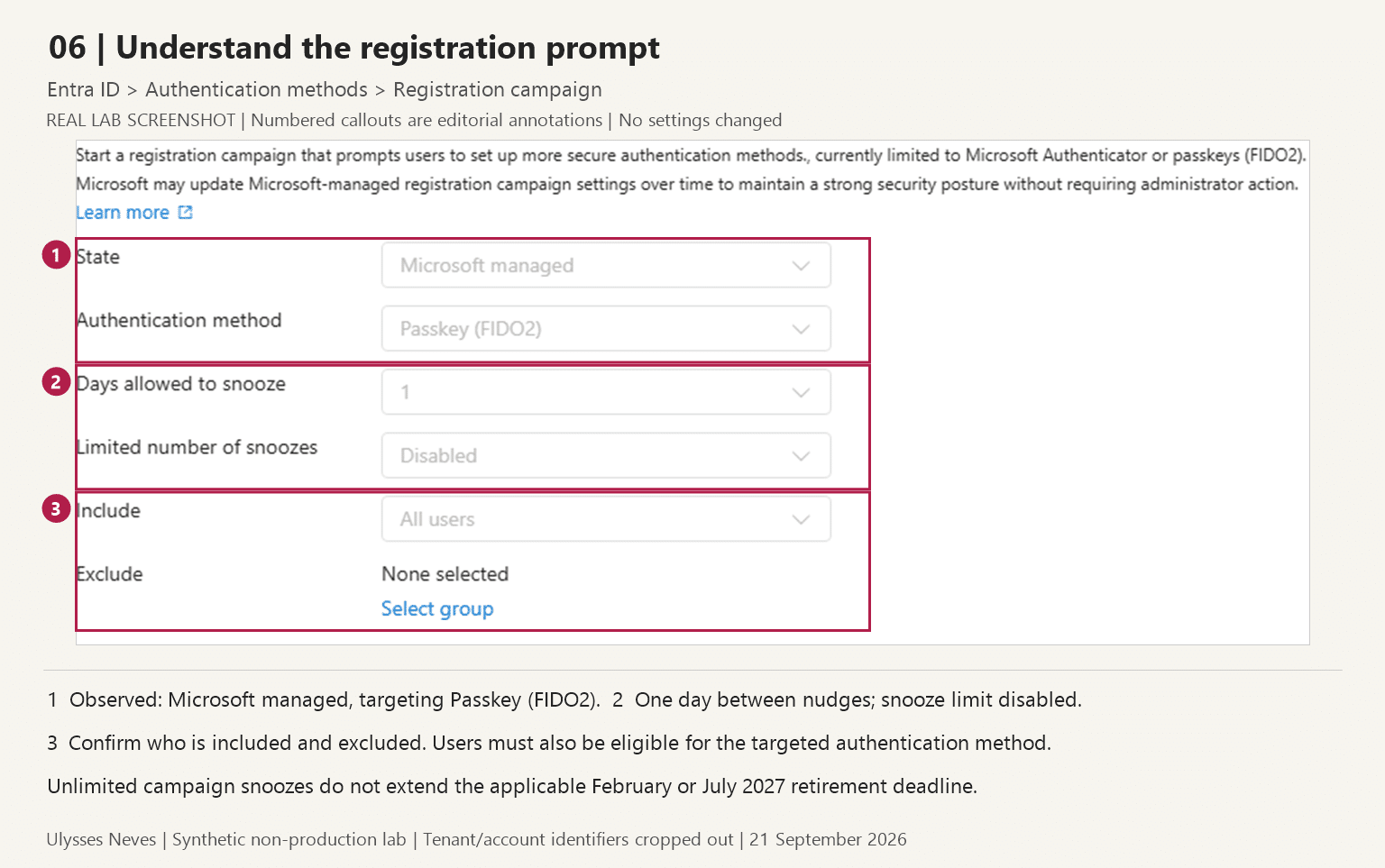
Registration campaign in the lab, targeting passkeys with a one-day snooze interval and no snooze limit.
Figure 2. Review the targeted method, snooze settings and included users.

Here, Microsoft managed targets passkeys. “Limited number of snoozes: Disabled” means unlimited campaign snoozes—not a disabled campaign.

Unlimited snoozes do not extend the applicable retirement deadline.

Before expanding, confirm that pilot users can register and sign in with the intended method. Explain the expected prompt to users before changing campaign behavior.

Sources: Passkey configuration and registration campaigns.

3. Prepare password recovery separately

Open: Entra ID → Password reset → Properties / Authentication methods.
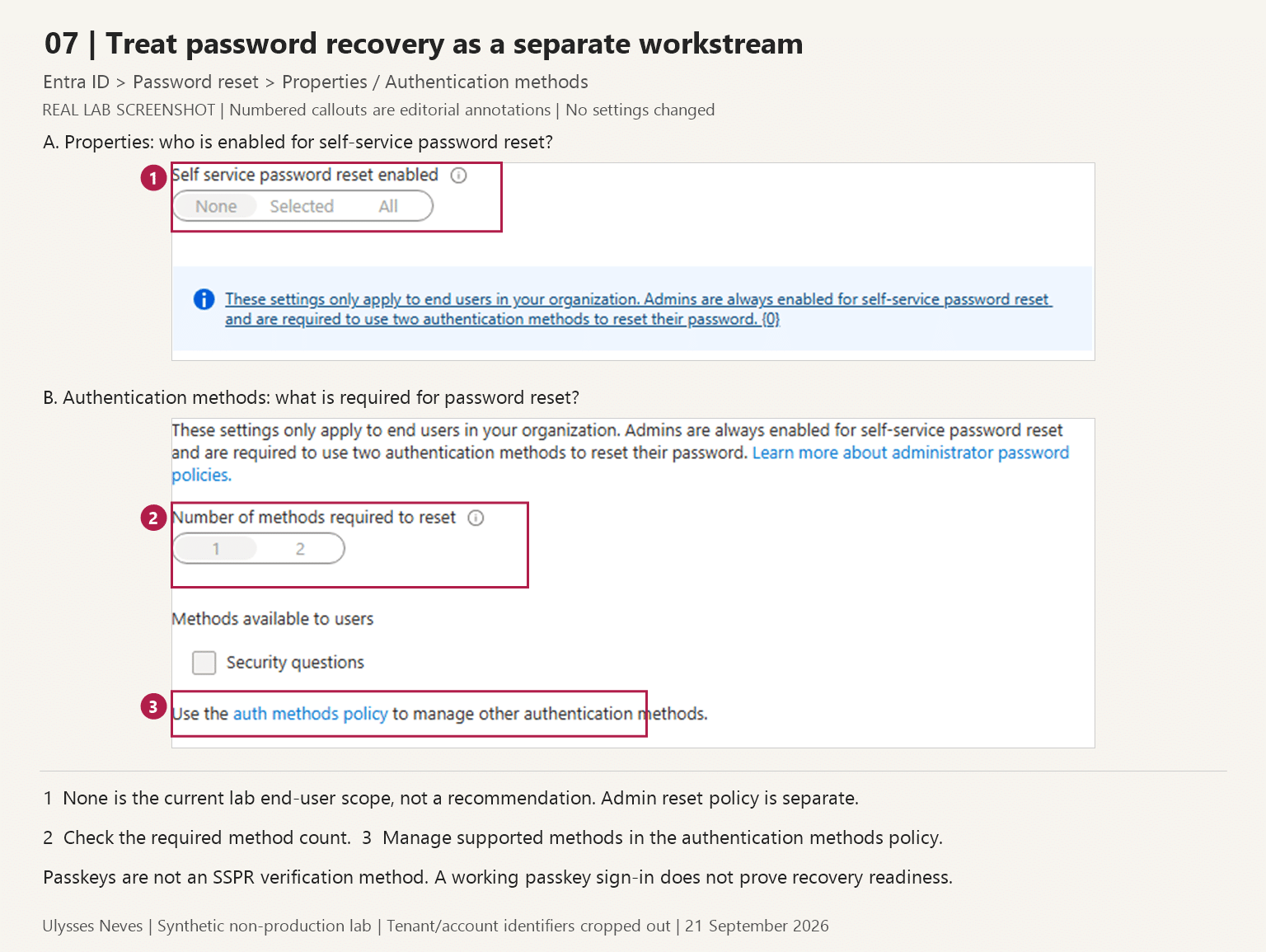
Password-reset settings in the lab, highlighting end-user scope, required method count and method-policy management.
Figure 3. Review recovery scope and requirements independently of sign-in readiness.

Check who is enabled for self-service password reset, how many verification methods are required, and which supported methods users have registered.

Passkeys are not an SSPR verification method. Successful passkey sign-in does not prove password recovery is ready.

The screenshot’s None scope is a lab value, not a recommendation. Administrator recovery has separate policy considerations.

Sources: SSPR requirements and authentication-method limitations.

Final takeaway

Before removing an existing authentication method, make sure you can answer four questions:

  1. Who depends on it, and which deadline applies?
  2. Can those users register and use an appropriate replacement?
  3. Can they recover access without the retiring dependency?
  4. Have exceptions and user communications been addressed?

Inventory first, establish a working alternative, prepare recovery, and then expand the migration.

Information current as of 21 September 2026. Microsoft’s documentation and rollout details may change; consult the linked public sources before implementing changes.

Leave a Reply Cancel reply

Your email address will not be published. Required fields are marked *

Recent Posts

  • Microsoft Entra SMS and Voice Retirement: An Admin Preparation Checklist September 24, 2026
  • Microsoft Defender for Identity domain investigation: six questions to ask first September 10, 2026
  • Microsoft Entra Kerberos key rotation: what changes—and what administrators should check September 6, 2026
  • Microsoft Authenticator Will Block Jailbroken Devices in 2026 — What You Need to Know March 17, 2026
  • Enhancing Azure role activation security with FIDO2/Passkeys September 23, 2024

Archives

  • September 2026
  • March 2026
  • September 2024
  • April 2024
  • February 2024
  • December 2023
  • September 2023
  • July 2023
  • June 2023
  • May 2023
  • April 2023
  • March 2023
  • February 2023
  • January 2023
  • December 2022
  • October 2022
  • September 2022
  • August 2022
  • July 2022
  • June 2022
  • May 2022
  • April 2022
  • March 2022
  • February 2022
  • January 2022
  • December 2021
  • November 2021
  • October 2021
  • September 2021
  • August 2021
  • July 2021
  • June 2021
  • May 2021
  • April 2021
  • March 2021
  • February 2021
  • January 2021
  • December 2020
  • November 2020
  • October 2020
  • September 2020
  • August 2020
  • July 2020
  • June 2020
  • May 2020
  • April 2020
  • March 2020
  • February 2020
  • January 2020
  • December 2019
  • November 2019
  • October 2019
  • September 2019
  • August 2019
  • July 2019

Tags

#aaddownleveldevice #adfs #adfscertificate #adfscertificates #adfsmfaadapter #azureauth #azureCA #azuredevice #capolicy #cloudsummit2021 #conditionalaccess #conditionalaccesspolicy #deviceregistration #farmbehavior #gopasswordless #mfaserver #msidentity #namedlocation #securingazure #securingazuread #sslprivatekey #troubleshootingadfs #troubleshootingwaptrust #tshootadfs #waptrust #webapplicationproxy #WHFBcerttrust #whfbdeployment #WHfBhybridsetup #WHfBprovisioning #widdatabase adconnect AD FS authenticationstrength az500 azurepim Azure security cloudsecurity microsoft365 Microsoft Azure Microsoft Entra hybrid join Microsoft Entra ID Microsoft Entra MFA PowerShell WHfB
©2026 Ulysses Neves | Design: Newspaperly WordPress Theme
Ulysses Neves
Gerenciar Consentimento de Cookies
Para fornecer as melhores experiências, usamos tecnologias como cookies para armazenar e/ou acessar informações do dispositivo. O consentimento para essas tecnologias nos permitirá processar dados como comportamento de navegação ou IDs exclusivos neste site. Não consentir ou retirar o consentimento pode afetar negativamente certos recursos e funções.
Funcional Always active
O armazenamento ou acesso técnico é estritamente necessário para a finalidade legítima de permitir a utilização de um serviço específico explicitamente solicitado pelo assinante ou utilizador, ou com a finalidade exclusiva de efetuar a transmissão de uma comunicação através de uma rede de comunicações eletrónicas.
Preferências
O armazenamento ou acesso técnico é necessário para o propósito legítimo de armazenar preferências que não são solicitadas pelo assinante ou usuário.
Estatísticas
O armazenamento ou acesso técnico que é usado exclusivamente para fins estatísticos. O armazenamento técnico ou acesso que é usado exclusivamente para fins estatísticos anônimos. Sem uma intimação, conformidade voluntária por parte de seu provedor de serviços de Internet ou registros adicionais de terceiros, as informações armazenadas ou recuperadas apenas para esse fim geralmente não podem ser usadas para identificá-lo.
Marketing
O armazenamento ou acesso técnico é necessário para criar perfis de usuário para enviar publicidade ou para rastrear o usuário em um site ou em vários sites para fins de marketing semelhantes.
  • Manage options
  • Manage services
  • Manage {vendor_count} vendors
  • Read more about these purposes
Ver preferências
  • {title}
  • {title}
  • {title}