Current guidance — September 2026: Azure AD Connect V1 has been retired and is no longer supported. Microsoft recommends evaluating Microsoft Entra Cloud Sync before deploying Microsoft Entra Connect Sync.
Source: What are Microsoft Entra Connect and Connect Health?: “Azure AD Connect V1 has been retired as of August 31, 2022 and is no longer supported.” Microsoft also states: “Microsoft Entra Cloud Sync is the future of synchronization for Microsoft. It replaces Microsoft Entra Connect.”
Hello everyone. In today’s article, we’ll cover a bit about the Microsoft Entra Connect tool, explain the services that are part of this solution, and the synchronization service architecture it uses.
What is Microsoft Entra Connect?
Microsoft Entra Connect is an identity integration tool between on-premises solutions compatible with Microsoft Entra ID. This tool is mostly used to synchronize objects between the Active Directory on-premises and Microsoft Entra ID for access to SaaS applications, such as Office 365 and others published in the cloud.
Entra Connect is an evolution of the Dirsync, Azure AD Sync, and FIM (Forefront Identity Manager) tools, which had their support discontinued in 2017. It is used when you intend to deploy a hybrid identity environment, allowing the on-premises domain user to access applications hosted on Microsoft Azure.
Office 365 uses Microsoft Entra ID as the identity store for access, and with Entra Connect, it is possible to export objects from the on-premises domain, transforming the user experience when using cloud applications with the same credential.
Components of Microsoft Entra Connect
There are three primary components that make up Microsoft Entra Connect:
Sync Service: this is the service that ensures on-premises data is synchronized to the cloud.
AD FS: this is the component responsible for multifactor authentication in third-party applications. It is configured optionally.
Health: this is the component responsible for monitoring object synchronization. This component uses monitoring agents installed on the servers. There are three types of agents:
Microsoft Entra Connect Health for AD DS – Agent installed on the on-premises domain controllers to monitor the health of the on-premises domain.
Microsoft Entra Connect Health for AD FS – Agent installed on the servers in the AD FS farm to monitor the federation service.
Microsoft Entra Connect Health for Sync – Agent installed on the servers that perform object Sync to Microsoft Entra ID, and it allows you to monitor the health of the synchronization.
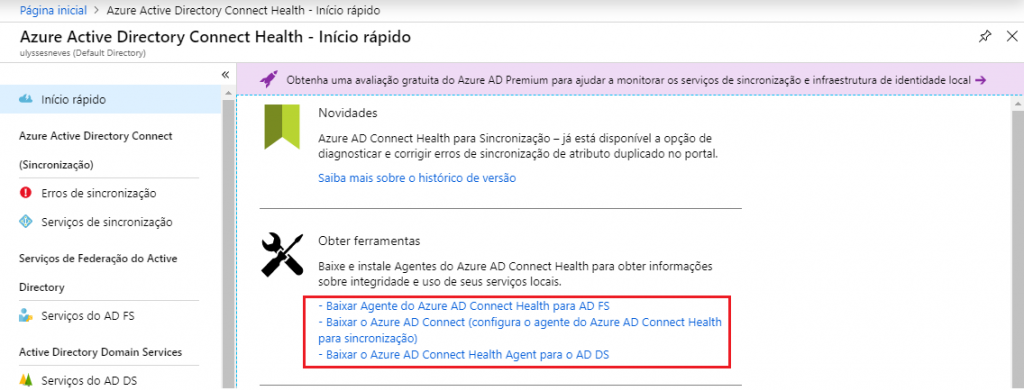
To access the Microsoft Entra Connect Health service, click this link and sign in with your credentials.
When you access the Microsoft Entra Connect Health portal, you can download the agents to monitor the service.
Architecture of Microsoft Entra Connect
The main component of Microsoft Entra Connect is the Sync Engine. It has an integrated view of all databases connected to the software.
Below we’ll explain a bit more about this component’s architecture in Microsoft Entra Connect:
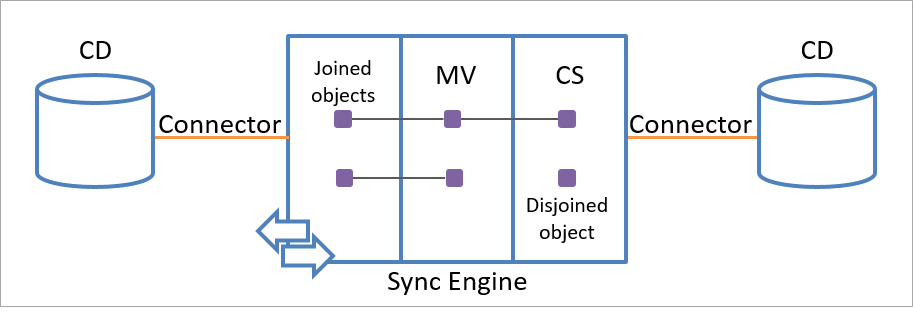
CD (Connected Data Source): this is the repository where the information to be replicated to Microsoft Entra ID is collected, which can be a database or the on-premises domain service itself. Any source in database format is a possible candidate for connecting to Microsoft Entra ID.
Connector: the connector is used in the form of an API to exchange access information between the sync engine and the data source. It allows information to flow in both directions, but not simultaneously.
CS (Connector Space): the connector space is the area for temporary storage of the objects selected for synchronization, flagged as new or changed in the source base and pending export.
MV (Metaverse): the Metaverse is the area that holds the information from all the connected data sources, providing a global view of all the information being synchronized and the custom rules in the synchronization configuration process for each source base.
Joined objects: these are used to connect an object in the connector space to a metaverse object.
Disjoined objects: these are used to keep an object stored in the connector space area without necessarily exporting it. This way, the sync engine always has the up-to-date state of the data source, making it possible to convert the object to joined at any time.
Hybrid authentication methods
With the advent of cloud infrastructures, it has become increasingly attractive for companies to keep their applications and services in more than one data center, ensuring availability and reducing maintenance costs.
To make it easier to access applications hosted in the cloud, ensuring a good user experience and the security needed to access these applications. Through the hybrid identity infrastructure, it is possible to use services similar to those used in the on-premises environment without losing the experience of accessing on-premises applications. To ensure a hybrid identity infrastructure, Microsoft Entra ID has three authentication methods, let’s take a look:
Password Hash Synchronization (PHS): PHS is the default method when using the express installation of Microsoft Entra Connect. In this method, the users’ password hash is synchronized to Microsoft Entra ID using encryption methods before sending and decryption after being sent to Microsoft Entra ID.
When PHS is enabled, an initial password SYNC occurs for all users. It is not possible to define a scope to be synchronized.
By default, a password hash synchronization occurs every 2 minutes. This time cannot be changed.
Pass-through Authentication (PTA): PTA gives the user the same convenience of using the same on-premises domain credential and password when using applications published in the cloud. This model uses agents installed on the server that has Microsoft Entra Connect installed, but to ensure high availability, it is recommended to install them on other servers in the same domain in standalone format, as long as they are running Windows Server 2012 R2 or later with TLS 1.2 enabled. For more information about installation requirements, go to this link.
This method is used when you intend to keep access verification and security policy enforcement in the on-premises environment, such as expired password, user without access to the environment at a given time, disabled user, etc.
Federation using AD FS: With this method, a federation is created between Microsoft Entra ID and the AD FS (Active Directory Federation Service) infrastructure, allowing users to sign in to applications stored on-premises or in the cloud using the same credentials.
With the federation trust configured, authentication requests are routed by Azure to the AD FS servers, which validate user credentials for internal and external access to the company’s network.
Summary
In today’s post, we explained a bit about the Microsoft Entra Connect tool, its architecture, and methods for implementing a hybrid identity infrastructure. We also introduced the tools for monitoring the health of the hybrid infrastructure through the Microsoft Entra Connect Health service.
In the next article, we’ll install Microsoft Entra Connect in express install mode, which is the most common form of hybrid identity deployment used.
I hope this content has contributed to enriching your knowledge of Azure.
Did you like the post? Like and share it. 🙂
If you have any suggestions or comments, let us know.
[ ]’s
Ulysses Neves

é possível eu gerenciar vários dominios on premise com um usuário administrador criado no ad connect?
Olá Axel. Você pode sincronizar vários domínios locais para um único tenant no Azure AD. neste documento você tem mais informações das topologias suportadas: https://docs.microsoft.com/pt-br/azure/active-directory/hybrid/plan-connect-topologies
Se você usar as configurações expressas ou atualizar do DirSync, deverá ter uma conta de administrador corporativo para seu Active Directory local. Referência: https://docs.microsoft.com/pt-br/azure/active-directory/hybrid/how-to-connect-install-prerequisites#accounts