Skip to content

Ulysses Neves

Microsoft Entra ID, authentication, and hybrid identity troubleshooting.

Menu
  • Home
  • Microsoft Azure
  • Microsoft AD FS
  • Microsoft 365
  • Contact
  • Troubleshooting Index
Menu

Microsoft Entra multifactor authentication – Identifying whether a user is blocked for MFA in Microsoft Entra ID

Posted on November 3, 2020

Hello, everyone. In today’s article I’ll bring a simple tip that can help support engineers identify users having trouble registering for MFA.

During the rollout of MFA in a corporation, users may be blocked by the administrator or have their accounts blocked when reporting fraud during an MFA validation contact in Azure.

Possible symptoms

To make it easier and simulate some errors that may be reported by users, I forced an MFA block on a user in my lab through the fraud report.

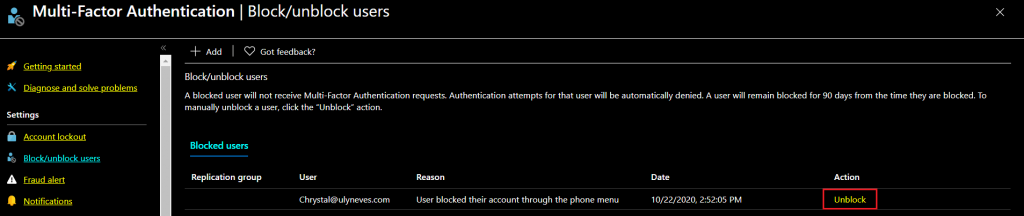
In the figure below we can confirm that the user chrystal@ulyneves.com is blocked for MFA:
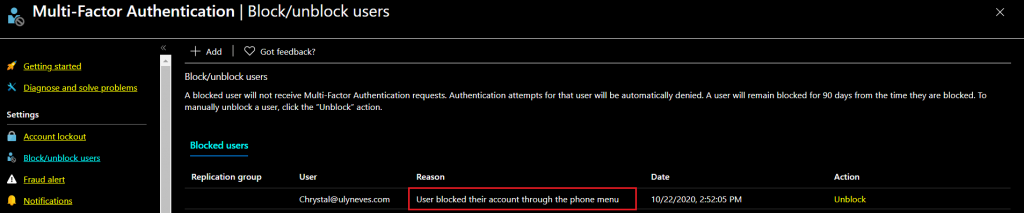
With the user blocked for MFA, they may receive one of the errors below, depending on which interface is being used to add MFA information:

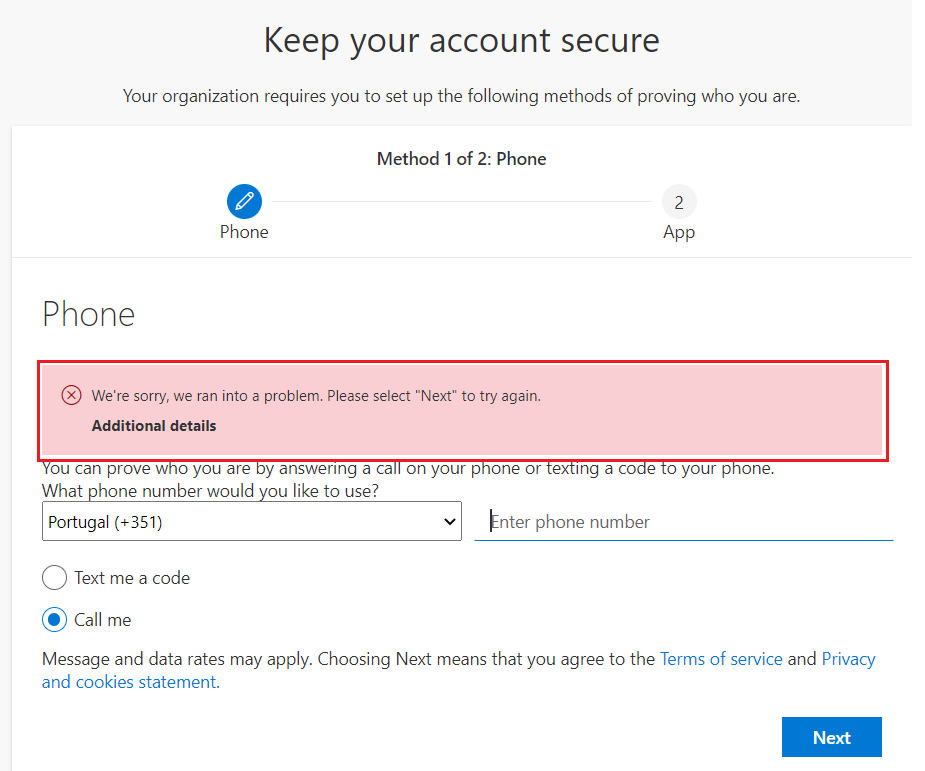
1 – On the MFA registration page aka.ms/mfasetup the error shown is: We’re sorry, we ran into a problem. Please select “Next” to try again.
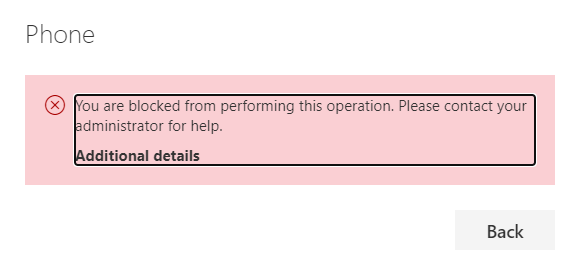
2 – On the user’s profile security info page, the message shown is: You are blocked from performing this operation. Please contact your administrator for help.
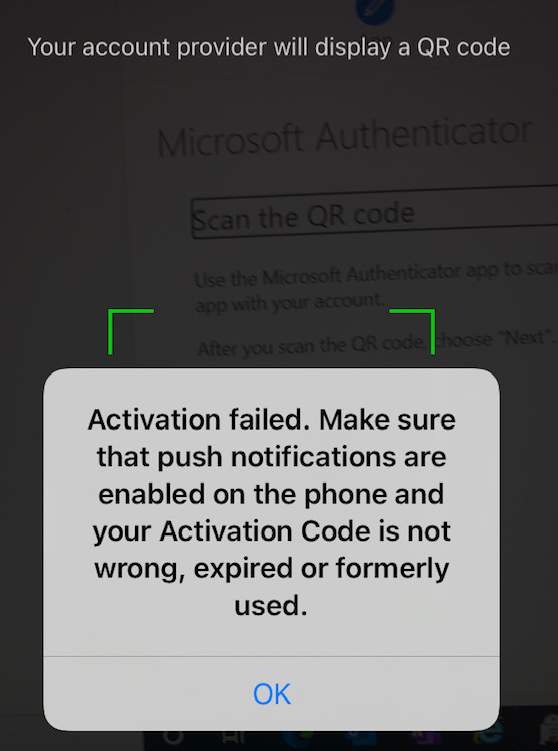
3 – In the Microsoft Authenticator app, when trying to add the account during the MFA registration process, you’ll receive an error while scanning the QR code: Activation failed. Make sure that push notifications are enabled on the phone and your Activation Code is not wrong, expired or formerly used.
Checking whether the user is blocked

To confirm whether the errors above are caused by a user blocked for MFA, simply access the menu Azure AD > Security > Multi-Factor Authentication > Block/unblock users or use this link.

As we can see, the user chrystal@ulyneves.com is blocked. Let’s click Unblock.
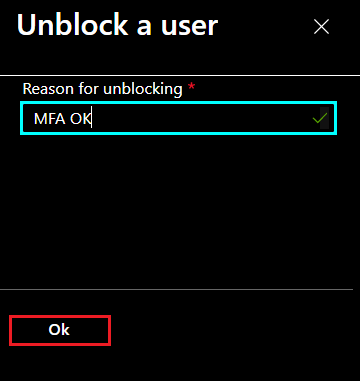
Let’s provide the reason for the unblock and click OK.
Testing access with the unblocked user

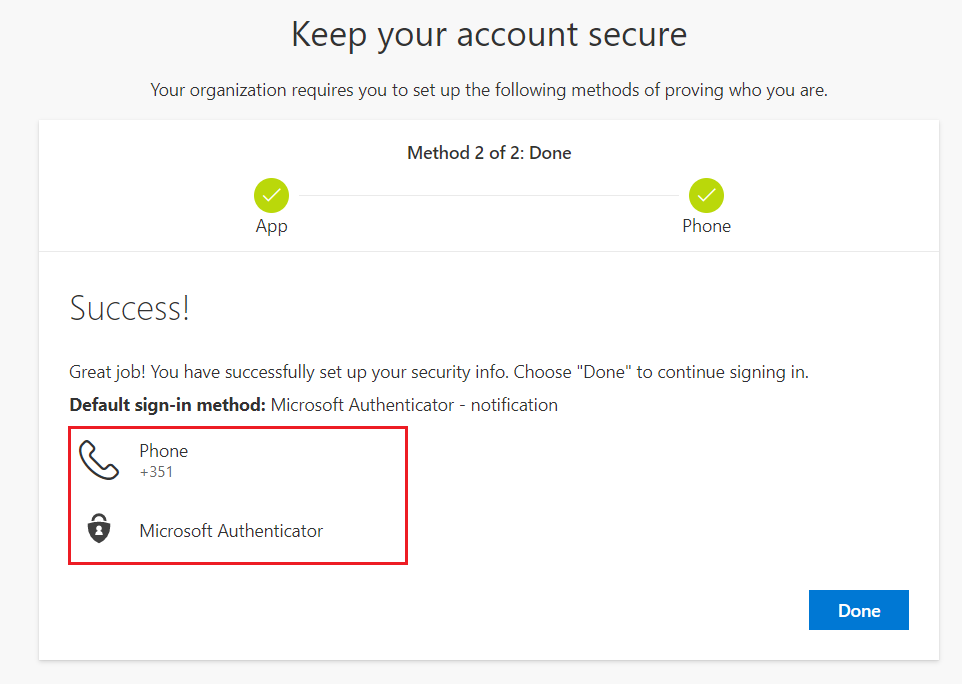
Now let’s test access with the unblocked user by accessing the address https://aka.ms/mfasetup

After following the steps to register the MFA information, we no longer receive the errors mentioned previously.
Quick tip

The setting responsible for automatically blocking users who report fraud is called Automatically block users who report fraud and is available in the menu Azure AD > Security > Multi-Factor Authentication > Fraud alert.
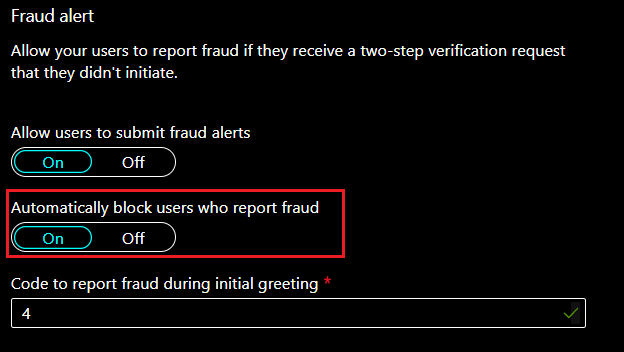
If you don’t want users to be blocked for MFA due to fraud, simply disable this option by switching the toggle to Off.

Summary

In today’s article, I explained how to identify and handle errors related to MFA blocking in the Microsoft Entra ID portal. I also explained how to disable the option that automatically blocks users who report fraud, in case the administrator doesn’t want to use this option.

I hope this content has helped enrich your knowledge of Microsoft Entra multifactor authentication.

Did you like the post? Like it and share it. 🙂

If you have any suggestions or comments, let us know.

[ ]’s

Ulysses Neves

Related guides: Browse the Microsoft Identity Troubleshooting Index or the Microsoft Entra multifactor authentication topic archive.

Leave a Reply Cancel reply

Your email address will not be published. Required fields are marked *

Recent Posts

  • Microsoft Entra Kerberos key rotation: what changes—and what administrators should check September 6, 2026
  • Microsoft Authenticator Will Block Jailbroken Devices in 2026 — What You Need to Know March 17, 2026
  • Enhancing Azure role activation security with FIDO2/Passkeys September 23, 2024
  • Microsoft Entra ID CAP | Enforcing WHfB using Authentication Strength April 21, 2024
  • Troubleshooting Error Code ‘0x000005e’ in WHfB: PIN Authentication Woes February 11, 2024

Archives

  • September 2026
  • March 2026
  • September 2024
  • April 2024
  • February 2024
  • December 2023
  • September 2023
  • July 2023
  • June 2023
  • May 2023
  • April 2023
  • March 2023
  • February 2023
  • January 2023
  • December 2022
  • October 2022
  • September 2022
  • August 2022
  • July 2022
  • June 2022
  • May 2022
  • April 2022
  • March 2022
  • February 2022
  • January 2022
  • December 2021
  • November 2021
  • October 2021
  • September 2021
  • August 2021
  • July 2021
  • June 2021
  • May 2021
  • April 2021
  • March 2021
  • February 2021
  • January 2021
  • December 2020
  • November 2020
  • October 2020
  • September 2020
  • August 2020
  • July 2020
  • June 2020
  • May 2020
  • April 2020
  • March 2020
  • February 2020
  • January 2020
  • December 2019
  • November 2019
  • October 2019
  • September 2019
  • August 2019
  • July 2019

Tags

#aaddownleveldevice #adfs #adfscertificate #adfscertificates #adfsmfaadapter #azureauth #azureCA #azuredevice #capolicy #cloudsummit2021 #conditionalaccess #conditionalaccesspolicy #deviceregistration #farmbehavior #gopasswordless #mfaserver #msidentity #namedlocation #securingazure #securingazuread #sslprivatekey #troubleshootingadfs #troubleshootingwaptrust #tshootadfs #waptrust #webapplicationproxy #WHFBcerttrust #whfbdeployment #WHfBhybridsetup #WHfBprovisioning #widdatabase adconnect AD FS authenticationstrength az500 azurepim Azure security cloudsecurity microsoft365 Microsoft Azure Microsoft Entra hybrid join Microsoft Entra ID Microsoft Entra MFA PowerShell WHfB
©2026 Ulysses Neves | Design: Newspaperly WordPress Theme
Ulysses Neves
Gerenciar Consentimento de Cookies
Para fornecer as melhores experiências, usamos tecnologias como cookies para armazenar e/ou acessar informações do dispositivo. O consentimento para essas tecnologias nos permitirá processar dados como comportamento de navegação ou IDs exclusivos neste site. Não consentir ou retirar o consentimento pode afetar negativamente certos recursos e funções.
Funcional Always active
O armazenamento ou acesso técnico é estritamente necessário para a finalidade legítima de permitir a utilização de um serviço específico explicitamente solicitado pelo assinante ou utilizador, ou com a finalidade exclusiva de efetuar a transmissão de uma comunicação através de uma rede de comunicações eletrónicas.
Preferências
O armazenamento ou acesso técnico é necessário para o propósito legítimo de armazenar preferências que não são solicitadas pelo assinante ou usuário.
Estatísticas
O armazenamento ou acesso técnico que é usado exclusivamente para fins estatísticos. O armazenamento técnico ou acesso que é usado exclusivamente para fins estatísticos anônimos. Sem uma intimação, conformidade voluntária por parte de seu provedor de serviços de Internet ou registros adicionais de terceiros, as informações armazenadas ou recuperadas apenas para esse fim geralmente não podem ser usadas para identificá-lo.
Marketing
O armazenamento ou acesso técnico é necessário para criar perfis de usuário para enviar publicidade ou para rastrear o usuário em um site ou em vários sites para fins de marketing semelhantes.
  • Manage options
  • Manage services
  • Manage {vendor_count} vendors
  • Read more about these purposes
Ver preferências
  • {title}
  • {title}
  • {title}