
Hi mates. Today we’re going to share how to identify and fix error message ‘The system cannot find the file specified’ when trying to add a new AD FS server to the farm.
Scenario:
AD FS version: 2019
Database type: WID
AD FS service account type: Group Managed Service Account (gMSA)
In case you are looking for information about adding a new AD FS farm using PowerShell, check out this article: AD FS – Joining a new federation server to an existing AD FS farm using PowerShell
When using AD FS Post-installation wizard, you might see error messages below:
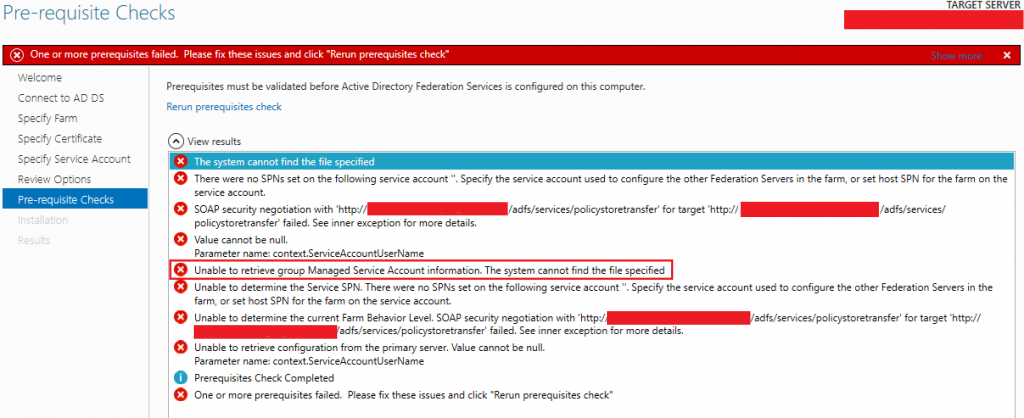
Considering that you have setup AD FS role on the new server and have already imported the SSL certificate with it’s private key to the certificate store on the new server, the next step to add the new server to the farm using PowerShell would be running the command below, so, let’s run it to reproduce the issue:
$fscredential = Get-Credential
Add-AdfsFarmNode -OverwriteConfiguration -PrimaryComputerName "PrimaryWIDHost" -PrimaryComputerPort 80 -ServiceAccountCredential $fscredential -CertificateThumbprint "8169c52b4ec6e77eb2ae17f028fe5da4e35c0bed"
Note: Update the command above with the information based on your AD FS environment.
Error message when using PowerShell:

writeErrorStream : True
PSMessageDetails :
Exception : Microsoft.IdentityServer.Diagnostics.Exceptions.DisplayableArgumentException: The system cannot find the file specified at Microsoft.IdentityServer.Configuration.Tasks.GroupManagedAccountInformation.GroupManagedAccountTask.DoGetGroupManagedAccountInformation(IGroupM
anagedAccountContext context, Boolean createIfNotExists)
at Microsoft.IdentityServer.Deployment.Core.Tasks.ConfigurationTaskBase.Execute(IDeploymentContext context, IProgressReporter progressReporter)
TargetObject :
CategoryInfo : NotSpecified: (:) [Add-AdfsFarmNode], DisplayableArgumentException
FullyQualifiedErrorId : DeploymentTask,Microsoft.IdentityServer.Deployment.Commands.JoinFarmCommand
ErrorDetails :
InvocationInfo : System.Management.Automation.InvocationInfo
ScriptStackTrace : at , : line 1
PipelineIterationInfo : {0, 1}
On AD FS Tracing logs, we see in details, steps followed by AD FS before adding the server to the farm below:
Running Pre-requisite tests for Microsoft.IdentityServer.Deployment.Commands.JoinFarmCommand.
Progress: Validating group Managed Service Account…
Progress: Retrieving group Managed Service Account information…
DoGetGroupManagedAccountInformation: System.ComponentModel.Win32Exception: The system cannot find the file specified
ErrorCode: -2147467259
NativeErrorCode: 2
StackTrace: at Microsoft.IdentityServer.Configuration.Providers.GroupManagedAccountInformationProvider.GetGroupManagedPassword(String dcName, String serviceAccountName, SecureString& gMSAPassword)
at Microsoft.IdentityServer.Configuration.Tasks.GroupManagedAccountInformation.GroupManagedAccountTask.DoGetGroupManagedAccountInformation(IGroupManagedAccountContext context, Boolean createIfNotExists)
Error: Exception: The system cannot find the file specified
StackTrace: at Microsoft.IdentityServer.Configuration.Tasks.GroupManagedAccountInformation.GroupManagedAccountTask.DoGetGroupManagedAccountInformation(IGroupManagedAccountContext context, Boolean createIfNotExists)
at Microsoft.IdentityServer.Deployment.Core.Tasks.ConfigurationTaskBase.Execute(IDeploymentContext context, IProgressReporter progressReporter)
Result: Status – Error, Message – Unable to retrieve group Managed Service Account information. The system cannot find the file specified, Context – DeploymentTask
Running Pre-requisite tests for Microsoft.IdentityServer.Deployment.Commands.JoinFarmCommand failed.
Cause: On AD FS installations using gMSA account, one of the requirements is that the gMSAaccount should be located on ‘CN=Managed Service Accounts’ container. Reference: https://learn.microsoft.com/en-us/windows-server/identity/ad-fs/overview/ad-fs-requirements#BKMK_4
During the AD FS requirements check, AD FS service will validate gMSA account’s information on the default container. If the account is not located on this container, AD FS service will not be able to locate it and the process will fail.
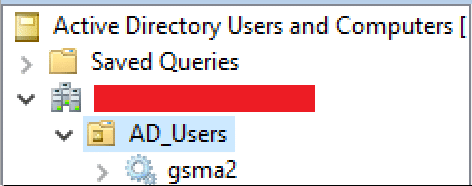
Searching for my gMSA account, I could confirm it’s not in the correct AD container as below because I moved it to be able to reproduce the issue:
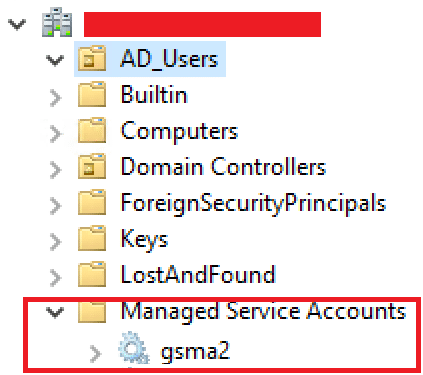
Fix: To fix this issue, move the gMSA account back to the AD container ‘CN=Managed Service Accounts’, wait for the replication and run the commands again as below:
Validating the fix
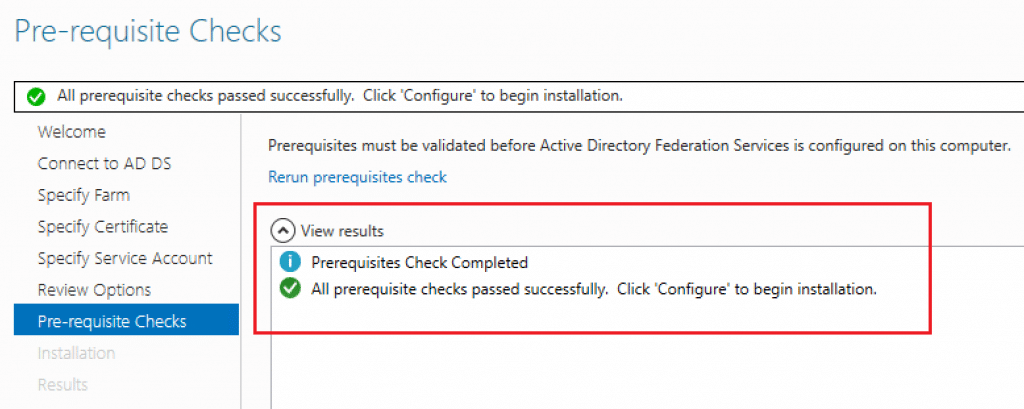
Once we move the gMSA account back to the correct container, if the wizard is being used, click on Rerun prerequisites check as below:

You might get a successful validation as below:
On PowerShell, you might get a successful message as below:

Summary
In this article, we covered how to identify and fix error message ‘The system cannot find the file specified’ when trying to add a new AD FS server to the farm.
I hope you have enjoyed reading this article and it helps you manage your AD FS environment.
Enjoyed the article? Like and share. 🙂
Note: I do not represent the organization I work for, all the opinions expressed here, are my own. This post is provided AS IS with no warranties or guarantees and confers no rights.
In case you have any suggestion or feedback, please leave a comment.
[ ]’s
Ulysses Neves
