
Hello everyone. Today, we’re going to investigate the error message ‘No domain controller is available for the specified domain or the domain does not exist: 0x8007054b‘ when trying to turn a domain-joined device into Hybrid Azure AD Joined.
Scenario: Azure AD Hybrid Device Join
In this article, we’ll focus on the error message, but if you are looking for the requirements and steps to implement Azure Ad Hybrid Device Join, please check this Official Microsoft implementation guide.
Checking device registration status
Prior to the Hybrid Join implementation, once you run the command dsregcmd /status on a windows 10 domain-joined machine, you may face the device state as below:
+———————————————————————-+
| Device State |
+———————————————————————-+
         AzureAdJoined : NO
      EnterpriseJoined : NO
          DomainJoined : YES
            DomainName : CORP
           Device Name : WS10-Hybrid.corp.contoso.com
In case you have DomainJoined is YES, and AzureAdJoined set to NO, means the device is currently joined to the OnPrem Active Directory only.
For more information about all parameters in the output, please check this Microsoft Official document.
Issue: You have implemented all steps and your domain-joined devices still don’t show AzureAdJoined as YES.
You face error message AD Connectivity Test : FAIL when running dsregcmd /status.
Investigating the issue
There are some events and tools that can be used to investigate device join process in the client. We are going to use below ones:
– Utility dsregcmd
– Event viewer log Microsoft-Windows-User Device Registration/Admin
Dsregcmd diagnostic data
Running dsregcmd /status using a command prompt in one affected machine, you can see in the Diagnostic Data that connectivity to OnPrem AD is failing. The failing phase is the pre-check. This is when the device runs all requirements to trigger the Azure AD automatic join process.
+———————————————————————-+
| Diagnostic Data |
+———————————————————————-+
 Diagnostics Reference : www.microsoft.com/aadjerrors
          User Context : SYSTEM
           Client Time : 2022-06-07 16:58:32.000 UTC
  AD Connectivity Test : FAIL
 AD Configuration Test : SKIPPED
    DRS Discovery Test : SKIPPED
 DRS Connectivity Test : SKIPPED
Token acquisition Test : SKIPPED
 Fallback to Sync-Join : ENABLED

 Previous Registration : 2022-06-07 16:41:09.000 UTC
           Error Phase : pre-check
      Client ErrorCode : 0x1
By default, once you have all steps to the Hybrid Join in place, the user sign-in triggers the Automatic Device Join task. The Automatic Device Join tasks is triggered on domain join and retried every hour. You can also open the command prompt as administrator and run command dsregcmd /debug /join.
You may face output similar to this one:
C:\Users\ulyneves>dsregcmd /debug /join
DsrCLI: logging initialized.
DsrCLI: logging initialized.
DsrCmdJoinHelper::Join: ClientRequestId: 08f70efe-0f59-4856-8ddd-XXXXXXXXdeDsrCmdAccountMgr::IsDomainControllerAvailable: DsGetDcName No domain controller is available for the specified domain or the domain does not exist: 0x8007054b.
PreJoinChecks Complete.
preCheckResult: DoNotJoin
deviceKeysHealthy: undefined
isJoined: undefined
isDcAvailable: NO
isSystem: YES
keyProvider: undefined
keyContainer: undefined
dsrInstance: undefined
elapsedSeconds: 11
resultCode: 0x1
The device can NOT be joined because a domain controller could not be located.
Now, checking the Event viewer log Microsoft-Windows-User Device Registration/Admin with event ID 334, we can confirm the device is lacking communication with OnPrem AD:
Automatic device join pre-check tasks completed.
The device can NOT be joined because a domain controller could not be located. The device must be connected to a network with connectivity to an Active Directory domain controller.
REASON: With the events above, it’s clear that we have a lack of communication between the device and the domain controller, which is a requirement to have a successful automatic Hybrid Azure AD Join.
As per Microsoft’s official documentation, we conclude the failure is occurring in the pre-check phase. Step B where is explained: The task queries Active Directory using the LDAP protocol for the keywords attribute on the service connection point stored in the configuration partition in Active Directory (CN=62a0ff2e-97b9-4513-943f-0d221bd30080,CN=Device Registration Configuration,CN=Services,CN=Configuration,DC=corp,DC=contoso,DC=com). The value returned in the keywords attribute determines if device registration is directed to Azure Device Registration Service (ADRS) or the enterprise device registration service hosted on-premises.
FIX: Make sure your Hybrid joined machine has proper connectivity to a domain controller to have a successful LDAP query.
Considering I blocked the communication to reproduce the issue, after removing the firewall rule and restoring the connectivity between the client and the domain controller, the join process is successful as below:
Join request ID: 979d242b-57de-4749-a84d-XXXXXXXX
Join response time: Tue, 07 Jun 2022 17:15:03 GMT
Join HTTP status: 200
DsrCmdJoinHelper::Join: completed successfully
DSREGCMD_END_STATUS
AzureAdJoined : YES
EnterpriseJoined : NO
DeviceId : f4caef4d-c69b-44e5-b1ff-919010c2699c
Thumbprint : XXXXXXXXXXXXXXXXXXXXXXXXXXXXXXXXXXX
DeviceCertificateValidity : [ 2022-06-07 16:45:04.000 UTC — 2032-06-07 17:15:04.000 UTC ]
KeyContainerId : ce7d06f2-05c5-4b6b-b528-XXXXXXXXXXX
KeyProvider : Microsoft Software Key Storage Provider
TpmProtected : NO
DeviceAuthStatus : SUCCESS
And we confirm with the output of command dsregcmd /status, that the affected device has both Azure DomainJoined and AzureAdJoined set to YES.
+———————————————————————-+
| Device State |
+———————————————————————-+
         AzureAdJoined : YES
      EnterpriseJoined : NO
          DomainJoined : YES
            DomainName : CORP
           Device Name : WS10-Hybrid.corp.contoso.com
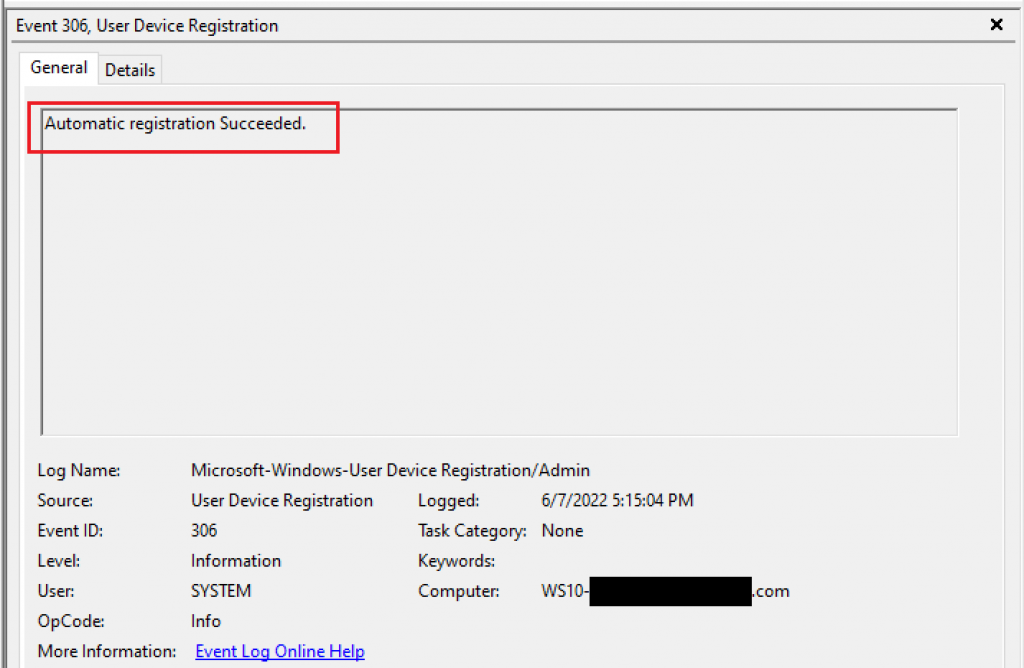
Checking the same event viewer log Microsoft-Windows-User Device Registration/Admin in the event viewer, we can confirm with event ID 306 that Automatic registration succeeded.
Summary
In this article, we covered how to investigate the error message ‘No domain controller is available for the specified domain or the domain does not exist: 0x8007054b‘ when trying to turn a domain-joined device into Hybrid Azure AD Joined.
I hope you have enjoyed reading this article, and it helps you manage your Hybrid devices in Azure AD.
Enjoyed the article? Like and share. 🙂
Note: I do not represent the organization I work for, all the opinions expressed here, are my own. This post is provided AS IS with no warranties or guarantees and confers no rights.
In case you have any suggestions or feedback, please leave a comment.
[ ]’s
Ulysses Neves
