
Hi everyone. Today we’re going to cover a specific error when establishing trust between Web Application Proxy and AD FS servers: ‘The Web request failed because the web.config is malformed. Access Denied’.
The microsoft.identityServer.proxyservice.exe.config is a file that holds some proxy configurations such as trust certificate thumbprint, congestion control thresholds, client service ports, AD FS federation service name and other configurations.
Error
You might face error below when trying to establish or reestablish the trust between WAP and AD FS:
An error occurred attempting to update the proxy service configuration file. An error occurred when attempting to save the proxy configuration.

Checking AD FS/Admin events on the WAP server, we find two events reporting errors:
Event ID 383:
The Web request failed because the web.config file is malformed.
User Action:
Fix the malformed data in the web.config file.
Exception details:
An error occurred loading a configuration file: Access to the path ‘C:\windows\ADFS\Config\microsoft.identityServer.proxyservice.exe.config’ is denied. (C:\windows\ADFS\Config\microsoft.identityServer.proxyservice.exe.config)
Access to the path ‘C:\windows\ADFS\Config\microsoft.identityServer.proxyservice.exe.config’ is denied.
Event ID: 199
The federation server proxy could not be started.
Reason: Error retrieving proxy configuration from the Federation Service.
Additional Data
Exception details:
An error occurred when attempting to load the proxy configuration.
Fix: By default, when AD FS proxy service is installed on the Windows server, the permission below is given to the required accounts and suffices the requirements to have the file microsoft.identityServer.proxyservice.exe.config updated as part of the Proxy trust configuration:
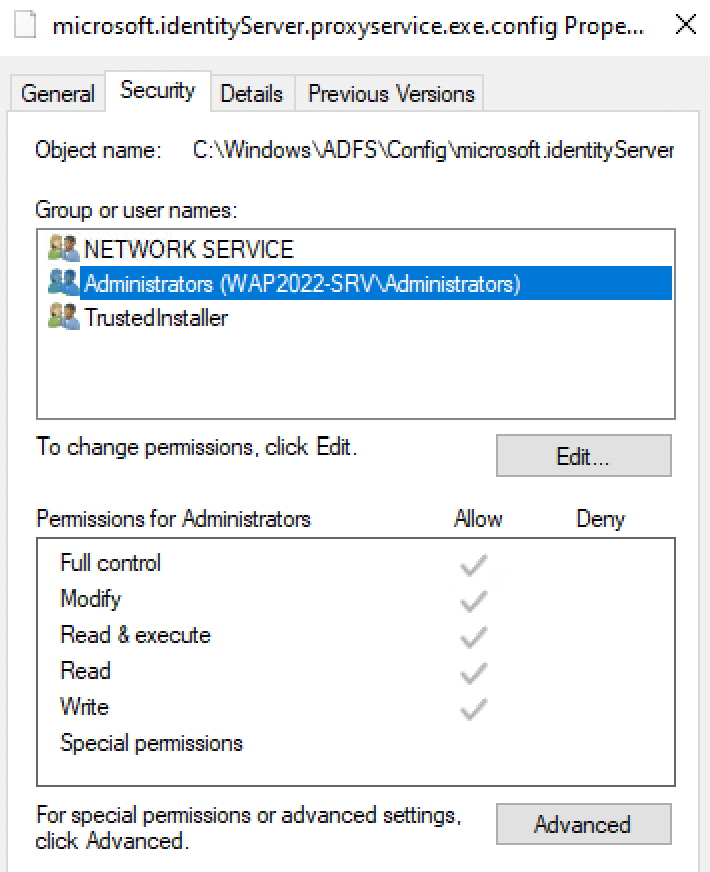
To fix this issue, make sure the permissions above are properly configured on the file ‘microsoft.identityServer.proxyservice.exe.config’ located on ‘C:\Windows\ADFS\Config’ in the Web Application Server.
After the service is reinstalled, we can reestablish the trust using commands below:
$FScredential = Get-Credential
Install-WebApplicationProxy -FederationServiceName "FS01.Contoso.com" -FederationServiceTrustCredential $FScredential -CertificateThumbprint "0a1b2c3d0a1b2c3d0a1b2c3d0a1b2c3d0a1b2c3d"
Note: Modify the Federation Service name and Certificate Thumbprint according to your environment.

With the successful trust configuration. you might see event 245 being registered on WAP server:
Log Name: AD FS/Admin
Source: AD FS
Event ID: 245
Task Category: None
Level: Information
Keywords: AD FS
Computer: WAP
Description: The federation server proxy successfully retrieved and updated its configuration from the Federation Service ‘XXXXXXXX’.
Summary
In this article, we covered how to troubleshoot error ‘The Web request failed because the web.config is malformed. Access Denied’ when establishing the trust between WAP and AD FS server.
I hope you have enjoyed reading this article, and it helps you to manage your AD FS environment.
Enjoyed the article? Like and share. 🙂
In case you have any suggestions or feedback, please leave a comment.
[ ]’s
Ulysses Neves
