Hello everyone. Today, we’re going to investigate the error message ‘The registration service could not successfully authenticate your account.‘ when trying to Hybrid join domain-joined down-level device into Azure AD.
INTRODUCTION
Mainly, Windows 10 and Windows Server 2016 or above are considered under the current devices’ category. Older Windows client and server versions are called Windows Down-level devices, such as Windows 8.1 and Windows Server 2012 R2 or below. For more information about supported versions for AAD Hybrid Join, check this official document: https://learn.microsoft.com/en-us/azure/active-directory/devices/hybrid-azuread-join-plan#review-supported-devices
The requirements and configuration steps to join down-level devices are slightly different from current devices. For more information in how to setup your environment to join down-level devices, please check this link: https://learn.microsoft.com/en-us/azure/active-directory/devices/howto-hybrid-join-downlevel
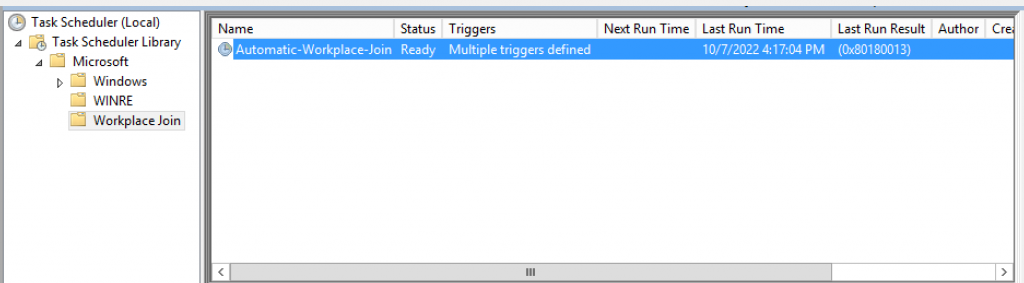
Once you have the setup in place and install the Microsoft Workplace Join for Windows down-level computers in the client machine, the scheduled task below is created:
In order to illustrate possible issues when joining down-level devices into Azure AD, let’s simulate one scenario:
Scenario:
Client: Windows Server 2012
Join type: AAD Hybrid Join
IDP: AD FS
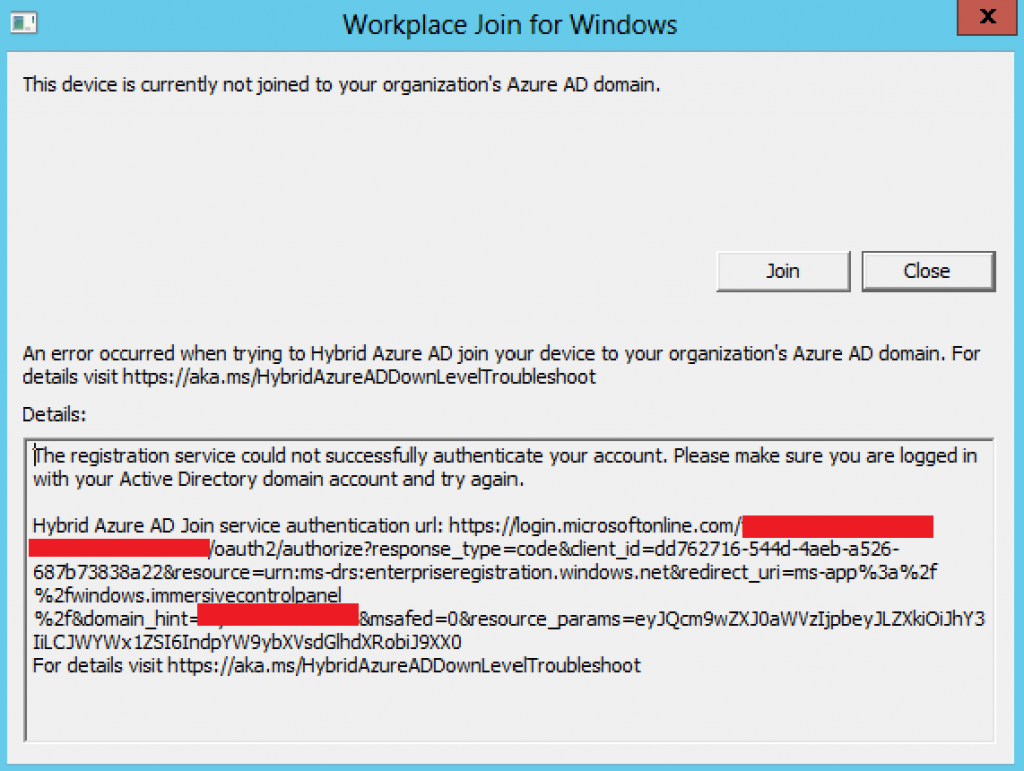
ERROR: During the join process, you might face error message below:
Checking client logs under ‘Microsoft-Workplace Join/Admin’, we see:
Event ID: 400
Hybrid Azure AD Join error:
Error Message: Failed to navigate to: https://login.microsoftonline.com/TENANTID/oauth2/authorize?response_type=code&client_id=CLIENTID&resource=urn:ms-drs:enterpriseregistration.windows.net&redirect_uri=ms-app%3a%2f%2fwindows.immersivecontrolpanel%2f&domain_hint=contoso.com&msafed=0&resource_params=eyJQcm9wZXJ0aWVzIjpbeyJLZXkiOiJhY3IiLCJWYWx1ZSI6IndpYW9ybXVsdGlhdXRobi
For details visit https://aka.ms/HybridAzureADDownLevelTroubleshoot
TROUBLESHOOTING
In order to investigate this issue, we can count on Event viewer logs in the client and in AD FS server. Checking the client log Microsoft-Workplace Join/Admin we find:
Event ID: 404
The registration service could not successfully authenticate your account. Please make sure you are logged in with your Active Directory domain account and try again. Hybrid Azure AD Join service authentication url: https://login.microsoftonline.com/TENANTID/oauth2/authorize?response_type=code&client_id=CLIENTID&resource=urn:ms-drs:enterpriseregistration.windows.net&redirect_uri=ms-app%3a%2f%2fwindows.immersivecontrolpanel%2f&domain_hint=contoso.com&msafed=0&resource_params=eyJQcm9wZXJ0aWVzIjpbeyJLZXkiOiJhY3IiLCJWYWx1ZSI6IndpYW9ybXVsdGlhdXRobi
For details visit https://aka.ms/HybridAzureADDownLevelTroubleshoot
Event ID: 500
_OnBeforeNavigate2Webbrowser: Navigating to https://login.microsoftonline.com/TENANTID/oauth2/authorize?response_type=code&client_id=CLIENTID&resource=urn:ms-drs:enterpriseregistration.windows.net&redirect_uri=ms-app%3a%2f%2fwindows.immersivecontrolpanel%2f&domain_hint=contoso.com&msafed=0&resource_params=eyJQcm9wZXJ0aWVzIjpbeyJLZXkiOiJhY3IiLCJWYWx1ZSI6IndpYW9ybXVsdGlhdXRobi
» Checking AD FS logs ‘AD FS Tracing/Debug‘, we see:
Event ID: 54
Received request with following properties: Date: 2022-10-08 22:15:04 Remote endpoint: X.X.X.X Local endpoint: X.X.X.X Http method: GET Request Url: /adfs/ls/ Query string: ?wauth=http%3a%2f%2fschemas.microsoft.com%2fclaims%2fwiaormultiauthn&client-request-id=a5c28b55-2086-4d8c-8141-2415ce71fdd8&username=&wa=wsignin1.0&wtrealm=urn%3afederation%3aMicrosoftOnline&wctx=estsredirect%3d2%26estsrequest%3drQQIARAA02I21DO0UklJMTczMjc00zU1MUnRNUlMTdJNNDUy0zWzME8yN7Ywtkg0MioS4hII7T60tE2hx7fRUUX0XOHfG7MYBUpzKouLU4vzUstSi_WS83NXMarnFusmFhRY6euXZ-al5JcX62Xm5qYWFWeWpSbn55UU5ecUJOal5ujvYGS8wMh4i4nf37G0JMMIROQXZValNjAzrmLWLS3KswIalFJUbJWaV5JaVFCUWZxalJqeWVxSlFiSmZ-nBzM9L7VkE7NKWoqxpZmxaYqupZm5oa6cZLJDWbGCyyMr1h4DJitODjYBJgkGBQYfrAwLmIF-q0qOMPl1fYY1_W-Ofc_rfBkOMWqn6fvXJXhWxAZmBLoXOFnWmTunF4cbhSQ65lSqZ-VFJXjFKwfFhRUVOqW72lraGU4gY3xAxtjBzvjLk5iw6CJh5eDQYiT83WnZm_VylseB3gZfvDNPNb5csX6VW89AA2 Local Port: 443 User agent string: Mozilla/4.0 (compatible; MSIE 7.0; Windows NT 6.2; Win64; x64; Trident/7.0; .NET4.0E; .NET4.0C) Body data length: 0 Caller Identity: – Certificate Identity: – Relying Party: – Through proxy: True Proxy name: WS2019-WAP Serialized Header: {“UA-CPU”:”AMD64″,”X-MS-Forwarded-Client-IP”:”WAP SERVER PUBLIC IP”,”X-MS-ADFS-Proxy-Client-IP“:”WAP SERVER PUBLIC IP“,”client-request-id”:”a5c28b55-2086-4d8c-8141-2415ce71fdd8″,”X-MS-Proxy”:”WS2019-WAP“,”X-MS-Endpoint-Absolute-Path”:”/adfs/ls/”,”Accept”:”/“,”Accept-Encoding”:”gzip, deflate”,”Accept-Language”:”en-US”,”Host”:”fs.contoso.com”,”User-Agent”:”Mozilla/4.0 (compatible; MSIE 7.0; Windows NT 6.2; Win64; x64; Trident/7.0; .NET4.0E; .NET4.0C)”}
Event ID: 155
Following request context headers present:
X-MS-Client-Application: –
X-MS-Client-User-Agent: –
client-request-id: a5c28b55-2086-4d8c-8141-2415ce71fdd8
X-MS-Endpoint-Absolute-Path: /adfs/ls/
X-MS-Forwarded-Client-IP: X.X.X.X
X-MS-Proxy: WS2019-WAP
X-MS-ADFS-Proxy-Client-IP: X.X.X.X
» Checking ‘AD FS Tracing/Debug‘ on the WAP server, we see the request:
Received request with following properties:
Date: 2022-10-08 21:54:17
Remote endpoint: 10.0.0.10
Local endpoint: 10.0.0.12
Http method: GET
Request Url: /adfs/ls/
Query string: ?wauth=http%3a%2f%2fschemas.microsoft.com%2fclaims%2fwiaormultiauthn&client-request-id=4838cd18-119b-4a6c-8e8c-2f54da8ff2fd&username=&wa=wsignin1.0&wtrealm=urn%3afederation%3aMicrosoftOnline&wctx=estsredirect%3d2%26estsrequest%3
Local Port: 443
REASON:
To be able to Hybrid join Windows down-level devices, WIA is used and to have this working fine, the AD FS farm’s federation name should resolve the internal AD FS IP. When sending the authentication request through WAP server, WIA is not an option for authentication, therefore, the Hybrid Join will fail.
FIX:
To fix this issue, we will configure AD FS federation name to resolve one of the AD FS servers. In your case, if you have load balancers, you can configure the name resolution to the internal load balancer instead.
For more information on the federation requirements for Hybrid Join, please check this document: https://learn.microsoft.com/en-us/azure/active-directory/devices/hybrid-azuread-join-plan#federated-environment
RESULT:
After fixing the name resolution configuration, the Automatic Workplace Join task works as expected.

With the successful Hybrid Join, let’s check a few logs to confirm if everything is fine:
Checking the client log ‘Microsoft-Workplace Join/Admin‘, we see:
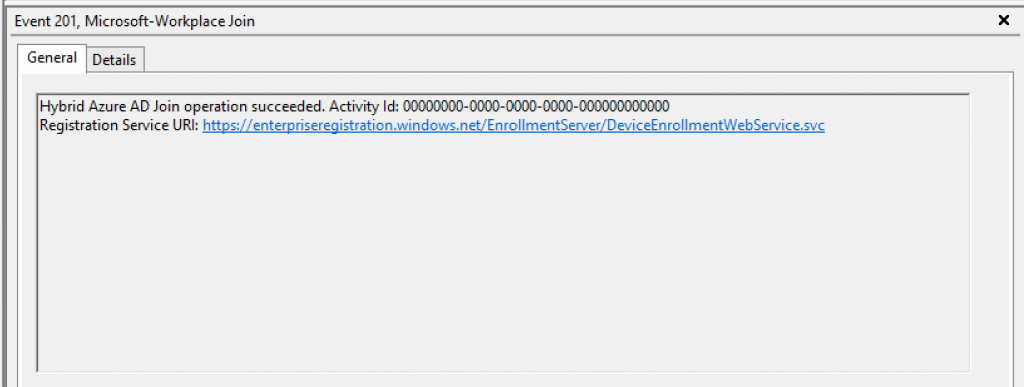
Event ID: 201
Hybrid Azure AD Join operation succeeded. Activity Id: 00000000-0000-0000-0000-000000000000
Registration Service URI: https://enterpriseregistration.windows.net/EnrollmentServer/DeviceEnrollmentWebService.svc
Event ID: 100
Hybrid Azure AD Join discovery succeeded.
Checking AD FS logs ‘AD FS Tracing/Debug‘, we see:
Event ID: 54
Received request with following properties:
Date: 2022-10-08 22:34:39
Remote endpoint: 10.0.0.12
Local endpoint: 10.0.0.14
Http method: GET
Request Url: /adfs/Proxy/webapplicationproxy/store
Query string: ?api-version=1
Local Port: 443
User agent string: –
Body data length: 0
Caller Identity: –
Certificate Identity: –
Relying Party: –
Through proxy: False
Proxy name: –
Serialized Header: {“Connection”:”Keep-Alive”,”Host”:”fs.contoso.com”,”X-MS-Endpoint-Absolute-Path”:”/adfs/Proxy/webapplicationproxy/store”}
Summary
In this article, we covered how to investigate the error message ‘The registration service could not successfully authenticate your account.’ when trying to Hybrid join domain-joined down-level device into Azure AD.
I hope you have enjoyed reading this article, and it helps you manage your Hybrid devices in Azure AD.
Enjoyed the article? Like and share. 🙂
Note: I do not represent the organization I work for, all the opinions expressed here, are my own. This post is provided AS IS with no warranties or guarantees and confers no rights.
In case you have any suggestions or feedback, please leave a comment.
[ ]’s
Ulysses Neves
