Entra in Practice · Episode 1
Editorial scope: This is a documentation-based explainer, not a report of a completed lab.
Hello everyone. If you manage Windows Hello for Business cloud Kerberos trust, Microsoft Entra Kerberos is already part of your authentication design. Microsoft’s deployment guide identifies it as a required component of that model.
But what happens when its key changes? What protects tickets issued before the rotation? And does a reliability improvement mean administrators can stop thinking about the transition?
Let’s connect Microsoft’s announcement to those practical questions.
Start with the change, not the command
In its June 2026 announcements, Microsoft listed a generally available reliability improvement for Microsoft Entra Kerberos key rotation, particularly for incoming trust referral flows.
Microsoft describes the previous failure condition:
“Previously, authentication failures could occur during Kerberos key rotation if referral tickets were encrypted with a secondary key.”
The announcement explains that validation now attempts decryption using both the primary and secondary Kerberos keys.
Why this matters: the important detail is not simply that a key was rotated. It is whether a ticket protected by the previous key can still be processed during the transition. That is the specific reliability scenario described in the announcement—not a statement that every Kerberos authentication failure has been resolved.
Understand the component you are maintaining
The Microsoft Entra Kerberos server object is a logical object, not another physical domain controller to deploy. Its key is maintained in on-premises Active Directory and securely published to Microsoft Entra ID. Microsoft documents that this key protects ticket-granting tickets issued by Microsoft Entra ID.
For Windows Hello for Business cloud Kerberos trust, Microsoft describes the associated AzureADKerberos computer object as appearing like a read-only domain controller without being associated with a physical server.
This distinction matters when reading documentation: the product name is Microsoft Entra Kerberos, while literal object and command names can still contain AzureAD.
Follow the tickets through a rotation
Consider two labels for illustration:
- Key A: the primary key before rotation.
- Key B: the newly generated key.
After rotation, B becomes primary and A becomes secondary. New tickets use the primary key; the secondary key remains available to validate existing tickets until they expire. This is the dual-key behavior documented by Microsoft. [2]
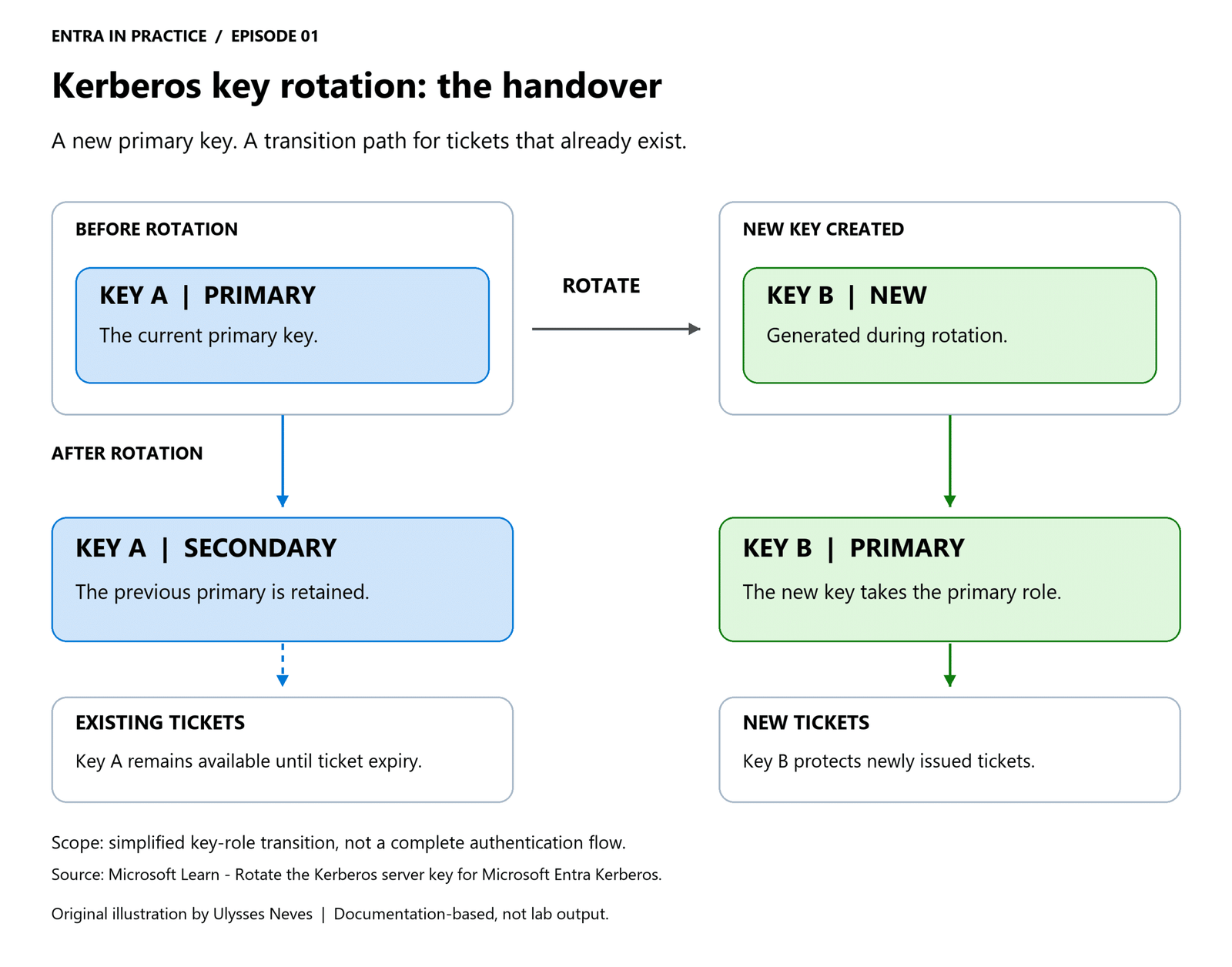
The overlap is deliberate. Microsoft’s documentation describes it as the mechanism for maintaining continuity while moving from one key to another.
Before opening PowerShell, answer these questions
| Question | What the Microsoft documentation establishes |
|---|---|
| Is Microsoft Entra Kerberos already configured? | An existing Microsoft Entra Kerberos server object is a prerequisite. |
| Which module is required? | AzureADHybridAuthenticationManagement. |
| What access is needed? | The guide lists domain-admin or equivalent AD DS credentials and cloud-admin credentials. Confirm the applicable requirements before execution. |
Can a generic krbtgt reset tool replace the documented method? | Microsoft specifically requires Set-AzureADKerberosServer for this operation so both AD DS and Microsoft Entra ID are updated. |
| Is there a universal rotation schedule? | The guide does not mandate a fixed interval; it recommends alignment with existing Kerberos security practices. |
The documented command is:
Set-AzureADKerberosServer -Domain $domain -CloudCredential $cloudCred -DomainCredential $domainCred -RotateServerKeyThis is a reference excerpt, not a ready-to-run lab script. The variables require the appropriate environment values and credentials. No credentials, command execution, or output are supplied in this article.
The name Set-AzureADKerberosServer is intentional: it remains the command shown in the current Microsoft documentation. It should not be “modernized” by changing its spelling.
One rotation is not the same as retiring every older key
Because the previous primary becomes secondary, generating a new key and fully retiring older keys are different milestones.
Microsoft states:
“To fully retire older keys, perform the rotation twice, ensuring that both the original primary and secondary keys have expired.”
Do not read that sentence as a complete instruction to run two immediate, back-to-back rotations.
Document not found: a universal waiting period between those rotations in the sources cited here. This article therefore does not prescribe a number of hours or an automated two-rotation sequence.
Likewise, it does not invent event IDs, expected command output, or a rollback procedure that these sources do not provide.
The operational takeaway
The June announcement addresses a specific secondary-key validation problem during incoming trust referral flows. The rotation guide explains the broader mechanism: introduce a new primary key while retaining the previous key as secondary.
For administrators, the useful distinction is:
A new key has been generated → existing tickets are still being accommodated → older keys are eventually retired.
Understanding those stages makes the documentation more useful than treating rotation as a command to copy and paste.
Original Microsoft sources
- Microsoft Entra releases and announcements — June 2026
- Rotate the Kerberos server key for Microsoft Entra Kerberos
- Windows Hello for Business cloud Kerberos trust deployment guide
Disclaimer: The views expressed here are personal and do not represent my employer. This article explains Microsoft’s published guidance; it does not claim hands-on validation. Review the current documentation and validate changes in an appropriate test environment before production use.
[ ]’s
Ulysses Neves
