Hello everyone. Today, we’re going to investigate the error message ‘None of the UPNs were successful for S4U Logon call‘ on AD FS servers when users are trying to authenticate from the extranet using a Web Application Proxy service.
Scenario: Users federated with AD FS trying to authenticate from the extranet.
User experience: When trying to authenticate against AD FS page from the extranet, after clicking on sign in, nothing happens:

On AD FS event viewer logs, error below can be observed:
Error: S4U Logon for user with upn ‘user1@contoso.com’ threw the following exception: ‘A specified logon session does not exist. It may already have been terminated’
Possible additional error: None of the UPNs were successful for S4U Logon call
Checking the Kerberos logs, we find error messages below:
KerbS4UToSelfLogon failed – 8009030e
Translating the error code ‘8009030e‘ using Microsoft Error Lookup Tool, we find:
C:\Users\user>Err_6.4.5.exe 8009030e for hex 0x8009030e / decimal -2146893042
SEC_E_NO_CREDENTIALS winerror.h
No credentials are available in the security package
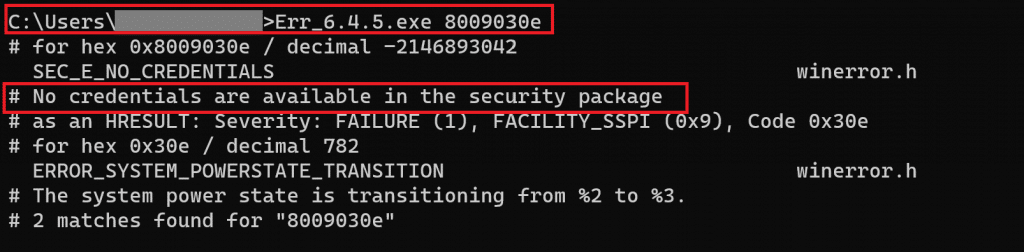
The Microsoft Error Lookup Tool – Win32 apps | Microsoft Learn
Investigating the issue
Based on the logs above, the AD FS service account is expected to request a ticket on behalf of the users authenticating over the internet via Web Application Proxy Service, known as S4U (Services for Users). If the AD FS service account is included in the domain’s ‘Protected Users Security Group’, it will be prevented from requesting the tickets and the authentication will fail.
Accounts for services and computers should not be members of the Protected Users group. This group provides no local protection because the password or certificate is always available on the host. Authentication will fail with the error “the username or password is incorrect” for any service or computer that is added to the Protected Users group.
FIX
Remove the AD FS service account from the domain group ‘Protected Users Security Group’.
Summary
In this article, we covered how to investigate and fix the error message ‘None of the UPNs were successful for S4U Logon call‘ on AD FS servers when users are trying to authenticate from the extranet.
I hope you have enjoyed reading this article, and it helps you manage your Hybrid devices in Azure AD.
Enjoyed the article? Like and share. 🙂
Note: I do not represent the organization I work for, all the opinions expressed here, are my own. This post is provided AS IS with no warranties or guarantees and confers no rights.
In case you have any suggestions or feedback, please leave a comment.
[ ]’s
Ulysses Neves
