
Skip to content

Ulysses Neves

Microsoft Entra ID, authentication, and hybrid identity troubleshooting.

Menu
  • Home
  • Microsoft Azure
  • Microsoft AD FS
  • Microsoft 365
  • Contact
  • Troubleshooting Index
Menu

Microsoft Entra Multifactor Authentication – Service Configuration

Posted on October 29, 2019

Hello, everyone. In today’s article, we’ll explain the required licensing and the MFA configuration options. We’ll also explain Conditional Access policies and how they help protect access together with MFA. This article covers the “configure multi-factor authentication settings” topic of the AZ-500 – Microsoft Azure Security Technologies exam. If you’re preparing to take this exam, don’t miss the upcoming articles on this blog.

Microsoft Entra Multifactor Authentication License

There are three MFA license editions in Azure, which are:

  • MFA for Azure AD Admins – This is the free edition for Azure global administrators until MFA is enabled, at which point everyone is billed for the service.
  • MFA for Office 365 – This edition is included in Office 365 user licenses.
  • Azure Multi-factor Authentication – This is the most complete MFA edition and is available by default in the P1 and P2 editions, and can also be included in custom subscriptions.

Conditional Access Policy

Conditional Access policies control access to a resource in Azure through requirements defined by the administrator, which may or may not require two-factor authentication, or other identity confirmations according to the requirements met.

Conditional Access policies can be applied to the resources below:

  • Azure portal
  • Azure Resource Manager provider
  • Classic management service APIs
  • Azure PowerShell
  • Azure Visual Studio portal
  • Azure DevOps
  • Azure Data Factory portal.

Configuring Two-Factor Authentication Methods

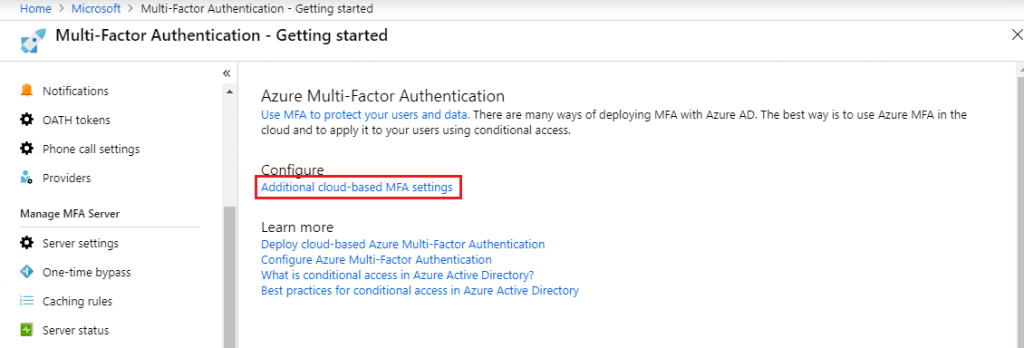
To define which verification categories will be used by users to confirm their identity, access this link and enter your Azure credentials.

Click the Additional cloud-based MFA setttings option.
The alt attribute for this image is empty. The file name is image-12-1024x348.png

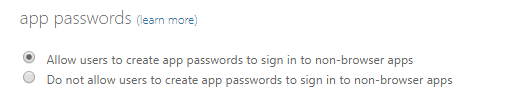
Applications older than Microsoft Office 2013 don’t use modern authentication and, to skip the second MFA verification, they need this option to be enabled.
Defining Trusted IPs

The Trusted IPs feature in Microsoft Entra multifactor authentication allows users connected on the company intranet or in federated environments to access Azure services without being prompted for two-factor authentication. There are two options to configure:

Skip multi-factor authentication for requests from federated users on my intranet

This option is used in hybrid federated environments with AD FS. The AD FS server sends a verification, and MFA identifies that the users are on an intranet, skipping the need to request a second authentication.

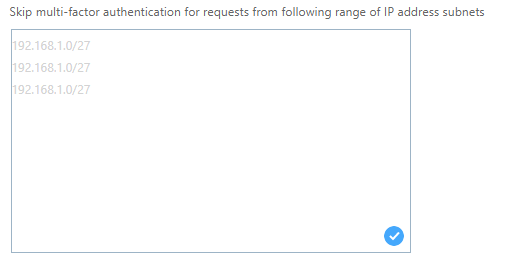
Skip multi-factor authentication for requests from following range of IP address subnets

This option is used when you have trusted networks where two-factor verification isn’t necessary. Only IPv4 network addresses can be included in this exemption model.
Configuring Verification Methods

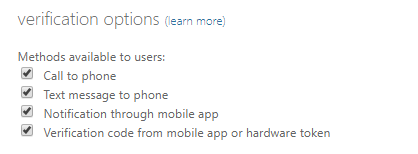
In the verification options menu, you can define which verification methods explained in this article will be used to validate users’ identity. In the previous article, we gave a brief introduction to each of these methods. If you haven’t read it yet, click this link.
The alt attribute for this image is empty. The file name is image-13.png

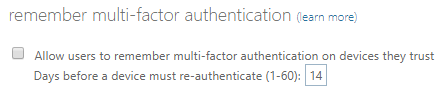
Remember multi-factor authentication

This option lets you define the period during which users will be prompted to perform two-factor authentication using MFA on their devices marked as trusted. When enabled, you can set a re-authentication period of up to 60 days.

When using browsers, users have an option not to authenticate for a number of days, and this is controlled through browser cookies. For applications not accessible through a browser, this is controlled every hour through token refreshes.
Summary

In today’s article, we talked about Microsoft Entra multifactor authentication licensing and Conditional Access policies, and explained the MFA configuration options.

In the next article, we’ll continue with the “Configure Microsoft Azure Active Directory for workloads” topic, explaining how to activate Microsoft Entra multifactor authentication for users in Azure.

I hope this content has contributed to enriching your knowledge of Azure.

Did you like the post? Like and share it. 🙂

If you have any suggestions or comments, leave a comment.

[ ]’s

Ulysses Neves

Related guides: Browse the Microsoft Identity Troubleshooting Index or the Microsoft Entra multifactor authentication topic archive.

Leave a Reply Cancel reply

Your email address will not be published. Required fields are marked *

Recent Posts

  • Microsoft Defender for Identity domain investigation: six questions to ask first September 10, 2026
  • Microsoft Entra Kerberos key rotation: what changes—and what administrators should check September 6, 2026
  • Microsoft Authenticator Will Block Jailbroken Devices in 2026 — What You Need to Know March 17, 2026
  • Enhancing Azure role activation security with FIDO2/Passkeys September 23, 2024
  • Microsoft Entra ID CAP | Enforcing WHfB using Authentication Strength April 21, 2024

Archives

  • September 2026
  • March 2026
  • September 2024
  • April 2024
  • February 2024
  • December 2023
  • September 2023
  • July 2023
  • June 2023
  • May 2023
  • April 2023
  • March 2023
  • February 2023
  • January 2023
  • December 2022
  • October 2022
  • September 2022
  • August 2022
  • July 2022
  • June 2022
  • May 2022
  • April 2022
  • March 2022
  • February 2022
  • January 2022
  • December 2021
  • November 2021
  • October 2021
  • September 2021
  • August 2021
  • July 2021
  • June 2021
  • May 2021
  • April 2021
  • March 2021
  • February 2021
  • January 2021
  • December 2020
  • November 2020
  • October 2020
  • September 2020
  • August 2020
  • July 2020
  • June 2020
  • May 2020
  • April 2020
  • March 2020
  • February 2020
  • January 2020
  • December 2019
  • November 2019
  • October 2019
  • September 2019
  • August 2019
  • July 2019

Tags

#aaddownleveldevice #adfs #adfscertificate #adfscertificates #adfsmfaadapter #azureauth #azureCA #azuredevice #capolicy #cloudsummit2021 #conditionalaccess #conditionalaccesspolicy #deviceregistration #farmbehavior #gopasswordless #mfaserver #msidentity #namedlocation #securingazure #securingazuread #sslprivatekey #troubleshootingadfs #troubleshootingwaptrust #tshootadfs #waptrust #webapplicationproxy #WHFBcerttrust #whfbdeployment #WHfBhybridsetup #WHfBprovisioning #widdatabase adconnect AD FS authenticationstrength az500 azurepim Azure security cloudsecurity microsoft365 Microsoft Azure Microsoft Entra hybrid join Microsoft Entra ID Microsoft Entra MFA PowerShell WHfB
©2026 Ulysses Neves | Design: Newspaperly WordPress Theme
Ulysses Neves
Gerenciar Consentimento de Cookies
Para fornecer as melhores experiências, usamos tecnologias como cookies para armazenar e/ou acessar informações do dispositivo. O consentimento para essas tecnologias nos permitirá processar dados como comportamento de navegação ou IDs exclusivos neste site. Não consentir ou retirar o consentimento pode afetar negativamente certos recursos e funções.
Funcional Always active
O armazenamento ou acesso técnico é estritamente necessário para a finalidade legítima de permitir a utilização de um serviço específico explicitamente solicitado pelo assinante ou utilizador, ou com a finalidade exclusiva de efetuar a transmissão de uma comunicação através de uma rede de comunicações eletrónicas.
Preferências
O armazenamento ou acesso técnico é necessário para o propósito legítimo de armazenar preferências que não são solicitadas pelo assinante ou usuário.
Estatísticas
O armazenamento ou acesso técnico que é usado exclusivamente para fins estatísticos. O armazenamento técnico ou acesso que é usado exclusivamente para fins estatísticos anônimos. Sem uma intimação, conformidade voluntária por parte de seu provedor de serviços de Internet ou registros adicionais de terceiros, as informações armazenadas ou recuperadas apenas para esse fim geralmente não podem ser usadas para identificá-lo.
Marketing
O armazenamento ou acesso técnico é necessário para criar perfis de usuário para enviar publicidade ou para rastrear o usuário em um site ou em vários sites para fins de marketing semelhantes.
  • Manage options
  • Manage services
  • Manage {vendor_count} vendors
  • Read more about these purposes
Ver preferências
  • {title}
  • {title}
  • {title}