
Hi mates. Today I will share with you a parameter introduced in AD FS version 2019 that can help users with wrong passwords when trying to sign in from the extranet. It’s called Extranet Lockout Threshold Familiar Location.
The ExtranetLockoutThresholdFamiliarLocation parameter is an independent lockout threshold for locations that are considered familiar comparing to unfamiliar locations so that users in known good locations can have more room for error comparing to unknown locations.
To use this option, your AD FS server must be on version 2019 and you must have the Extranet Smart Lockout enabled in the AD FS farm. In case you need help configuring this feature, please check this article called AD FS – Protecting users with the AD FS Extranet Smart Lockout
Enabling the Extranet Lockout Threshold Familiar Location
After enabling Extranet Smart Lockout, to configure this parameter, use the command below in the AD FS server:
Set-AdfsProperties -ExtranetLockoutThresholdFamiliarLocation 5With the command above, we have configured the Extranet Lockout threshold when the user is signing in from a familiar location to 5 as the Extranet threshold is set to 3.
In this scenario, if the user comes from an Unfamiliar location and provides 3 bad passwords, the access will be blocked. If the user comes from a public IP considered Familiar, the lock will happen if the user provides 5 bad passwords. This give the user 2 more attempts when coming from a familiar public IP.

Testing the Extranet Lockout
After configuring the parameter, I’ll have the user jack@ulyssesneves.com to test if the policy is working as expected. To reproduce correctly this feature, I have previously signed in with this user to let AD FS server register my public IP as Familiar for this user.
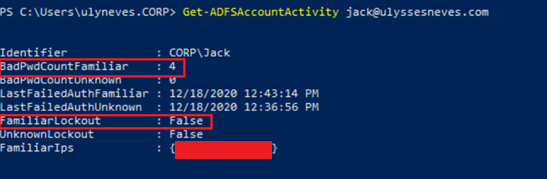
After providing 4 bad passwords, we see that parameter FamiliarLockout is still False, that means the user is not locked for Extranet Lockout and can still sign in if a good password is provided.
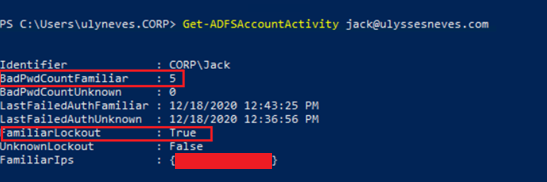
After typing once more the bad password, we reach the Extranet Lockout Threshold Familiar Location’s policy, and now we can see the user is locked. At this stage, the user won’t be able to sign in even if a good password is provided until the observation window configured in AD FS is reached or if the administrator resets his account lock status using the command Reset-ADFSAccountLockout.
Summary
In this article, we covered the parameter Extranet Lockout threshold for familiar location and how to configure it in AD FS. With this parameter correctly configured, users have more room for bad passwords when they come from public IPs that are considered familiar locations in AD FS.
I hope you have enjoyed reading this article and it helps you when administering your AD FS environment.
Enjoyed the article? Like and share. 🙂
In case you have any suggestion or feedback, please leave a comment.
[ ]’s
Ulysses Neves

Is this still valid? I dont see a switch called Externallockoutfamiliarlocation anymore.
Hello Krish. Thank you for your query. Extranet Lockout familiar location was introduced on AD FS version 2019. More information on this feature, you can get on this link: https://docs.microsoft.com/en-us/windows-server/identity/ad-fs/operations/configure-ad-fs-extranet-smart-lockout-protection#additional-features-in-ad-fs-2019