Skip to content

Ulysses Neves

Microsoft Entra ID, authentication, and hybrid identity troubleshooting.

Menu
  • Início
  • Microsoft Azure
  • Microsoft AD FS
  • Microsoft 365
  • Contact
Menu

AD FS – Accessing the certificate store of a gMSA account

Posted on 4 de February de 2021

Hi mates. Today we’re going to cover how to check Token signing and token decrypting certificates in the certificate store when you have a gMSA (Group Managed Service Accounts) account running AD FS service. AD FS token signing and token decrypting certificates are stored in the certificate store of the service account that runs AD FS.

Normally when you want to check the personal certificate store of a service account in AD FS you run the command prompt as another user, but when you have AD FS running with a gMSA account, you have no access to it’s password so, here comes a tip to help you check the self-signed token signing and token decrypting certificates in the certificate store.

Opening User Certificate Store for gMSA account

First, download PStools using this link and copy PsExec64.exe to your ADFS server.

After you follow the steps above, run the command below to obtain the gMSA account used by your AD FS server:

Get-ItemProperty -Path HKLM:\SYSTEM\CURRENTCONTROLSET\SERVICES\ADFSSRV | Select ObjectName

Open command prompt as administrator, navigate to the directory you copied PsExec64.exe file and execute it with parameters below:

PSExec64.exe -i -u Domain\gMSA$ -p ~ cmd.exe

Another command prompt window will open in the gMSA’s context. Run Certmgr.msc to open certificate store for user account.

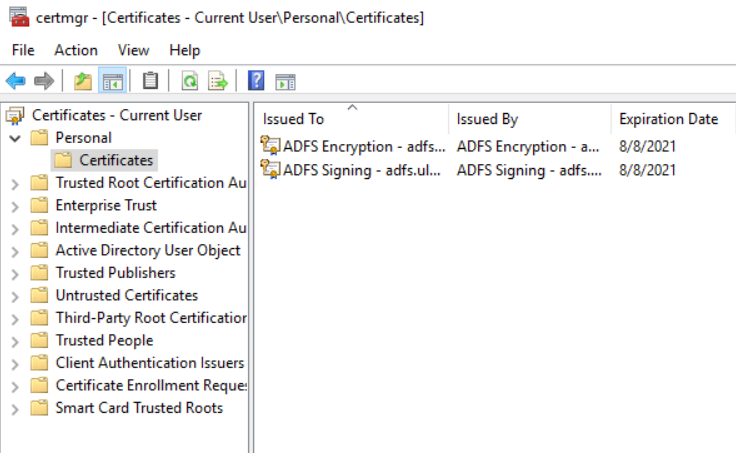
Now we can see all certificates that belongs to the certificate store of the gMSA account, including AD FS self-signed token signing and token decrypting certificates.
Summary

In this article, we covered how to open the certificate store as a gMSA account to be able to validate the self-signed token signing and token decrypting certificates.

I hope you have enjoyed reading this article, and it helps you to manage your AD FS environment.

Enjoyed the article? Like and share. 🙂

In case you have any suggestion or feedback, please leave a comment.

[ ]’s

Ulysses Neves

Leave a Reply Cancel reply

Your email address will not be published. Required fields are marked *

Recent Posts

  • Microsoft Authenticator Will Block Jailbroken Devices in 2026 — What You Need to Know 17 de March de 2026
  • Enhancing Azure role activation security with FIDO2/Passkeys 23 de September de 2024
  • Microsoft Entra ID CAP | Enforcing WHfB using Authentication Strength 21 de April de 2024
  • Troubleshooting Error Code ‘0x000005e’ in WHfB: PIN Authentication Woes 11 de February de 2024
  • WHfB: Fixing Windows Hello for Business error ‘LogoncertTemplateReady: NO (StateNoTemplate)’ 29 de December de 2023

Archives

  • March 2026
  • September 2024
  • April 2024
  • February 2024
  • December 2023
  • September 2023
  • July 2023
  • June 2023
  • May 2023
  • April 2023
  • March 2023
  • February 2023
  • January 2023
  • December 2022
  • October 2022
  • September 2022
  • August 2022
  • July 2022
  • June 2022
  • May 2022
  • April 2022
  • March 2022
  • February 2022
  • January 2022
  • December 2021
  • November 2021
  • October 2021
  • September 2021
  • August 2021
  • July 2021
  • June 2021
  • May 2021
  • April 2021
  • March 2021
  • February 2021
  • January 2021
  • December 2020
  • November 2020
  • October 2020
  • September 2020
  • August 2020
  • July 2020
  • June 2020
  • May 2020
  • April 2020
  • March 2020
  • February 2020
  • January 2020
  • December 2019
  • November 2019
  • October 2019
  • September 2019
  • August 2019
  • July 2019

Tags

#aaddownleveldevice #aadhybridjoin #adfs #adfsonsql #azuread #azureauth #azureCA #azuredevice #azurehybridjoin #azuremfa #azuresecurity #capolicy #cloudkerberostrust #conditionalaccess #conditionalaccesspolicy #deviceregistration #gmsaaccount #gopasswordless #hybridaadjoin #mfaserver #msadfs #msazure #msidentity #namedlocation #sslcertificatevalidation #tshootadfs #tshoothybridjoin #tshootwaptrust #waptrust #WHFBcerttrust #whfbdeployment #WHfBhybridsetup #widdatabase adconnect authenticationcontext authenticationstrength az500 azuread azuremfa azurepim azuresecurity cloudsecurity microsoft365 msazure WHfB
©2026 Ulysses Neves | Design: Newspaperly WordPress Theme
Ulysses Neves
Gerenciar Consentimento de Cookies
Para fornecer as melhores experiências, usamos tecnologias como cookies para armazenar e/ou acessar informações do dispositivo. O consentimento para essas tecnologias nos permitirá processar dados como comportamento de navegação ou IDs exclusivos neste site. Não consentir ou retirar o consentimento pode afetar negativamente certos recursos e funções.
Funcional Always active
O armazenamento ou acesso técnico é estritamente necessário para a finalidade legítima de permitir a utilização de um serviço específico explicitamente solicitado pelo assinante ou utilizador, ou com a finalidade exclusiva de efetuar a transmissão de uma comunicação através de uma rede de comunicações eletrónicas.
Preferências
O armazenamento ou acesso técnico é necessário para o propósito legítimo de armazenar preferências que não são solicitadas pelo assinante ou usuário.
Estatísticas
O armazenamento ou acesso técnico que é usado exclusivamente para fins estatísticos. O armazenamento técnico ou acesso que é usado exclusivamente para fins estatísticos anônimos. Sem uma intimação, conformidade voluntária por parte de seu provedor de serviços de Internet ou registros adicionais de terceiros, as informações armazenadas ou recuperadas apenas para esse fim geralmente não podem ser usadas para identificá-lo.
Marketing
O armazenamento ou acesso técnico é necessário para criar perfis de usuário para enviar publicidade ou para rastrear o usuário em um site ou em vários sites para fins de marketing semelhantes.
  • Manage options
  • Manage services
  • Manage {vendor_count} vendors
  • Read more about these purposes
Ver preferências
  • {title}
  • {title}
  • {title}