
Hi mates. Today we’re going to cover the error message System.Security.Cryptography.CryptographicException: Access is denied when configuring the trust between a Web application Proxy and AD FS servers.
How the WAP trust is built
Once you install the WAP service, you need to start a post-install task to establish the trust between the WAP and AD FS servers to have the WAP server act as a reverse proxy to the Relying Parties published on AD FS for users coming from the extranet. During the trust configuration process, you are required to provide an SSL certificate that will be used to establish secure communication to the federation service and a credential with admin permission on the AD FS server. During this process, a self-signed certificate is generated on the WAP server and replicated into the certificate store ADFSTrustedDevices located on the AD FS server using the AD FS service account. This store will contain all self-signed certificates generated by WAP servers that are authorized to request tokens from AD FS backend servers.
If the AD FS service account doesn’t have the appropriate permissions on the store ADFSTrustedDevices, you might face the error messages below when trying to establish the trust:
On PowerShell, you face error message below:
cmdlet Install-WebApplicationProxy at command pipeline position 1
Supply values for the following parameters: FederationServiceTrustCredential
Install-WebApplicationProxy : An error occurred when attempting to establish a trust relationship with the federation service. Error: Internal Server Error
On WAP Debug logs:
Error: Exception: An error occurred when attempting to establish a trust relationship with the federation service. Error: Internal Server Error
StackTrace: at Microsoft.IdentityServer.Management.Proxy.Providers.ProxyTrustProvider.EstablishTrustWithSts(ICredentials credentials, String thumbprint)
at Microsoft.IdentityServer.Deployment.Core.Tasks.ConfigurationTaskBase.Execute(IDeploymentContext context, IProgressReporter progressReporter)
Exception: The remote server returned an error: (500) Internal Server Error.
StackTrace: at System.Net.HttpWebRequest.GetResponse()
at Microsoft.IdentityServer.Management.Proxy.Providers.ProxyTrustProvider.EstablishTrustWithSts(ICredentials credentials, String thumbprint)
Result: Status – Error, Message – An error occurred while attempting to establish a trust relationship with the Federation Server. An error occurred when attempting to establish a trust relationship with the federation service. Error: Internal Server Error, Context – DeploymentTask
On AD FS Admin logs:
The federation server proxy could not establish a trust with the Federation Service.
Additional Data
Exception details: System.Security.Cryptography.CryptographicException: Access is denied.
at System.Security.Cryptography.X509Certificates.X509Store.Add(X509Certificate2 certificate)
at Microsoft.IdentityServer.WebHost.Configuration.Providers.DeviceStoreProvider.AddCertificateToStore(X509Certificate2 certificate)
at Microsoft.IdentityServer.ProxyTrust.ProxyTrustConfigProvider.EstablishProxyTrust(X509Certificate2 trustCertificate)
at Microsoft.IdentityServer.Web.ProxyTrustUserNameListener.OnGetContext(WrappedHttpListenerContext context)
User Action: Ensure that the credentials being used to establish a trust between the federation server proxy and the Federation Service are valid and that the Federation Service can be reached.
On AD FS Debug logs:
Exception: Access is denied.
StackTrace: at System.Security.Cryptography.X509Certificates.X509Store.Add(X509Certificate2 certificate)
at Microsoft.IdentityServer.WebHost.Configuration.Providers.DeviceStoreProvider.AddCertificateToStore(X509Certificate2 certificate)
Identifying the permissions on the ADFSTrustedDevices registry key
By default, the AD FS service account has permissions to write on the certificate store ADFSTrustedDevices. To confirm that, open the Windows Registry on the AD FS server and check if the AD FS service account has write permissions on path: Computer\HKEY_LOCAL_MACHINE\SOFTWARE\Microsoft\SystemCertificates\AdfsTrustedDevices
On our case below, to reproduce the issue, I removed the service account’s permissions on the folder.
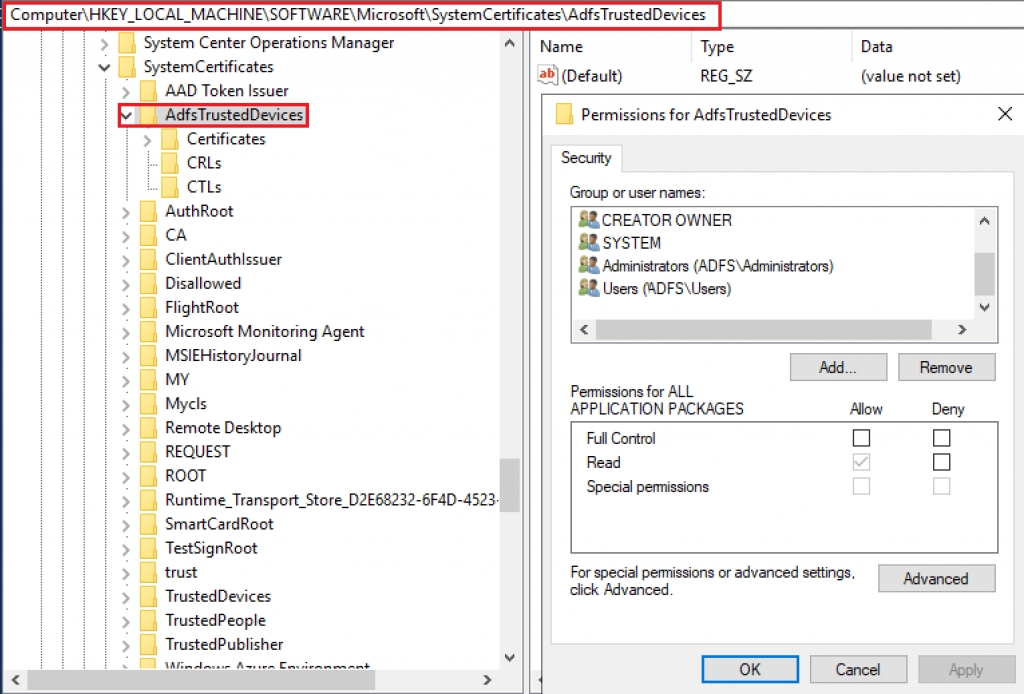
The scenario below can happen if the AD FS service account is removed by mistake from the folder above, blocking the account to be able to publish the proxy trust certificate generated by the Web Application Proxy servers.
Fixing the permissions on AdfsTrustedDevices’ registry
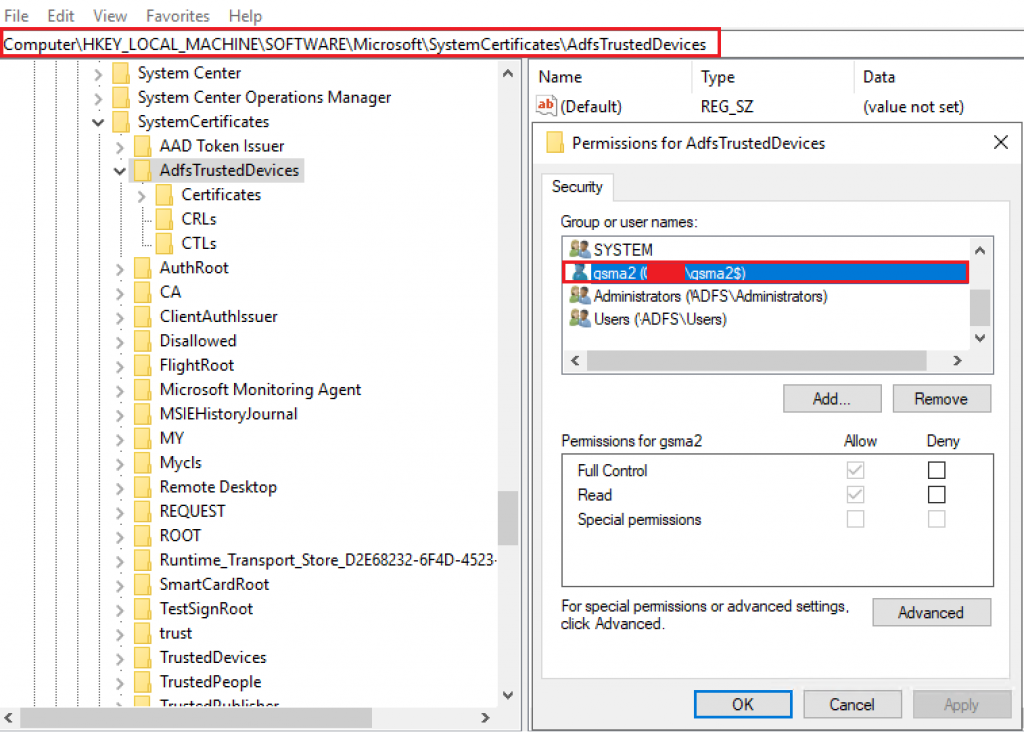
To fix the issue, add the AD FS service account with write permissions on the folder AdfsTrustedDevices using Windows Registry Editor as below:
Establishing the WAP trust
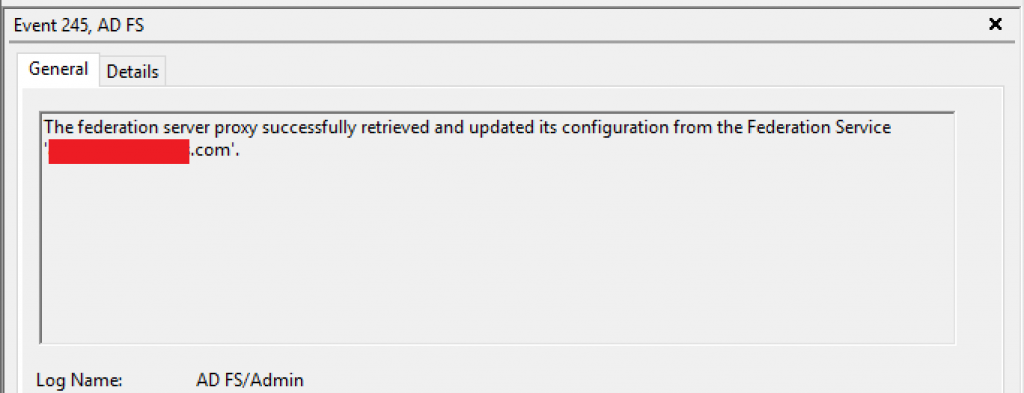
With the proper permissions set on the AD FS server, we are able to successfully establish the trust:

On WAP server, we confirm the successful trust configuration looking for event 245 on AD FS Admin logs inside Event Viewer:
Summary
In this article, we covered how to troubleshoot the error message System.Security.Cryptography.CryptographicException: Access is denied when configuring the trust between a Web application Proxy and AD FS servers.
I hope you have enjoyed reading this article, and it helps you to manage your AD FS environment.
Enjoyed the article? Like and share. 🙂
Note: I do not represent the organization I work for, all the opinions expressed here, are my own. This post is provided AS IS with no warranties or guarantees and confers no rights.
In case you have any suggestion or feedback, please leave a comment.
[ ]’s
Ulysses Neves
