Deprecation notice — September 2026: This article is retained as historical troubleshooting guidance for an existing on-premises MFA Server integration. MFA Server is deprecated and unavailable for new deployments. Migration to cloud-based Microsoft Entra multifactor authentication should be the primary action; use this repair procedure only for short-term service recovery during a controlled migration.
Source: Migrate from MFA Server to Microsoft Entra multifactor authentication: “Azure Multi-Factor Authentication Server (MFA Server) isn’t available for new deployments and is deprecated. Customers who are using MFA Server should move to using cloud-based Microsoft Entra multifactor authentication.”
Hi mates. Today we’re going to cover the error message ‘The selected authentication method is not available’ when you have AD FS integrated with MFA Server.
Scenario:
Identity Provider: AD FS
MFA Provider: MFA Server
Access Control Policy: Permit and require MFA
On the browser, users get the error message below when trying to authenticate against AD FS portal:

Investigating the issue
» Checking AD FS Admin logs, we find event ID 364 with error message below:
Exception details: Microsoft.IdentityServer.Web.Authentication.AuthenticationMethodUnavailableException: The selected authentication method is not available. Choose another authentication method or contact your system administrator for details.
at Microsoft.IdentityServer.Web.Authentication.External.ExternalAuthenticationHandler.ProcessContext(ProtocolContext context, IAuthenticationContext authContext, IAccountStoreUserData userData, IClaimsIdentity identity)
at Microsoft.IdentityServer.Web.Authentication.External.ExternalAuthenticationHandler.Process(ProtocolContext context)
at Microsoft.IdentityServer.Web.Authentication.AuthenticationOptionsHandler.Process(ProtocolContext context)
at Microsoft.IdentityServer.Web.PassiveProtocolListener.OnGetContext(WrappedHttpListenerContext context)
» Checking AD FS Tracing logs, we are able to get more information on the event ID above looking for event IDs:
Event ID 171: Sign-in option ‘AzureMfaServerAuthentication’ is currently selected.
Event ID 168: Failed to extract MSIS error code from message: The selected authentication method is not available. Choose another authentication method or contact your system administrator for details.. This is a bug, please report.
Event ID 183: ExternalAuthenticationHandler.Process() exception: Microsoft.IdentityServer.Web.Authentication.AuthenticationMethodUnavailableException: The selected authentication method is not available. Choose another authentication method or contact your system administrator for details.
at Microsoft.IdentityServer.Web.Authentication.External.ExternalAuthenticationHandler.ProcessContext(ProtocolContext context, IAuthenticationContext authContext, IAccountStoreUserData userData, IClaimsIdentity identity)
at Microsoft.IdentityServer.Web.Authentication.External.ExternalAuthenticationHandler.Process(ProtocolContext context) Identifier: AzureMfaServerAuthentication, ContextId:
Checking the MFA server adapter on AD FS
To confirm if the MFA Server adapter on AD FS server is working fine, restart AD FS service using PowerShell command below:
Restart-Service adfssrv
In case you find an event ID 105 with message ‘An error occurred initializing the ‘AzureMfaServerAuthentication‘ authentication provider.’, you should focus your troubleshooting on the MFA Server adapter instead until you receive the successful event ID 106 below. On this article, we’ll not focus on event ID 106.
Event ID 106: An authentication provider was successfully loaded: Identifier: ‘AzureMfaServerAuthentication’, Context: ‘Proxy device TLS pipeline’
Once confirmed the MFA Server adapter is loading correctly on AD FS server, and the users still face the issue, check on MFA Server if the affected users are enabled for MFA as configuration below:
Validating the user’s MFA configuration
On MFA Server, open Multi-Factor Authentication Server’s console.
Select option Users and check if the affected user’s MFA method is configured and the user is enabled for MFA on column Enabled:

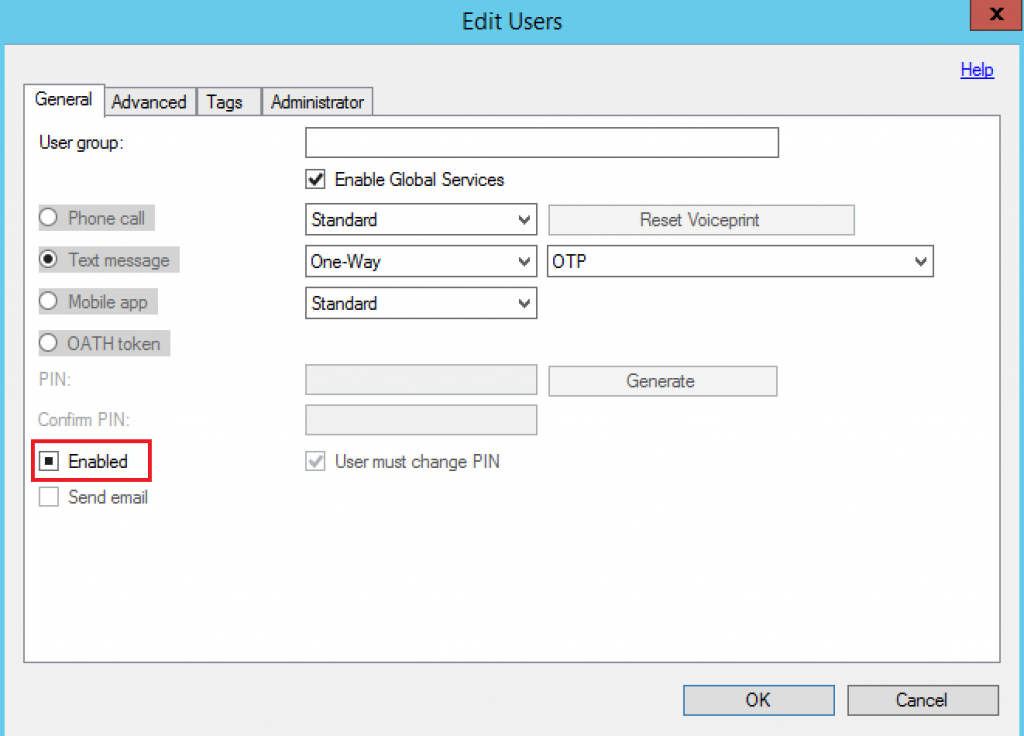
Issue: The affected user was disabled for MFA on the MFA Server. The default configuration is set to Enabled. If this setting is unchecked, then that user will not receive Multi-Factor Authentication calls.
Fix: Select all users who should be enabled for MFA, but have this setting unchecked, and click on Edit. Enable the MFA setting using the configuration below:
Validating the fix
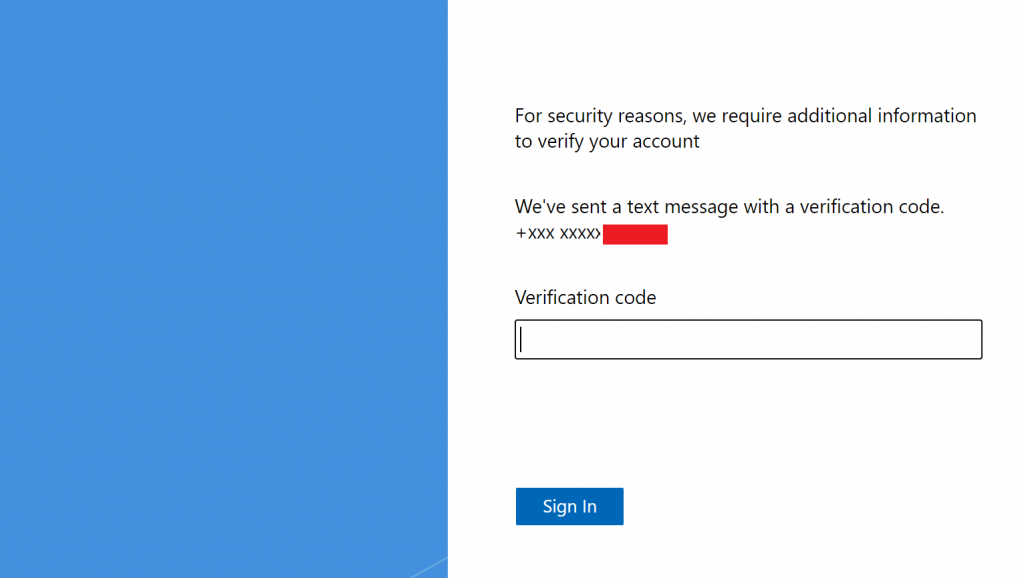
With the user Enabled for MFA on the MFA Server, the affected users should be prompted for MFA without issues as below:
Summary
In this article, we covered how to troubleshoot the error message ‘The selected authentication method is not available’ when you have AD FS integrated with MFA Server.
I hope you have enjoyed reading this article, and it helps you to manage your AD FS environment.
Enjoyed the article? Like and share. 🙂
Note: I do not represent the organization I work for, all the opinions expressed here, are my own. This post is provided AS IS with no warranties or guarantees and confers no rights.
In case you have any suggestion or feedback, please leave a comment.
[ ]’s
Ulysses Neves
