
Hi mates. Today, I will cover how to identify and fix the error message ‘Your credentials did not work’ during a sign-in against one Azure AD Joined machine on a federated Azure AD domain.
Device join type: Azure AD Join
Azure AD trust type: Federated
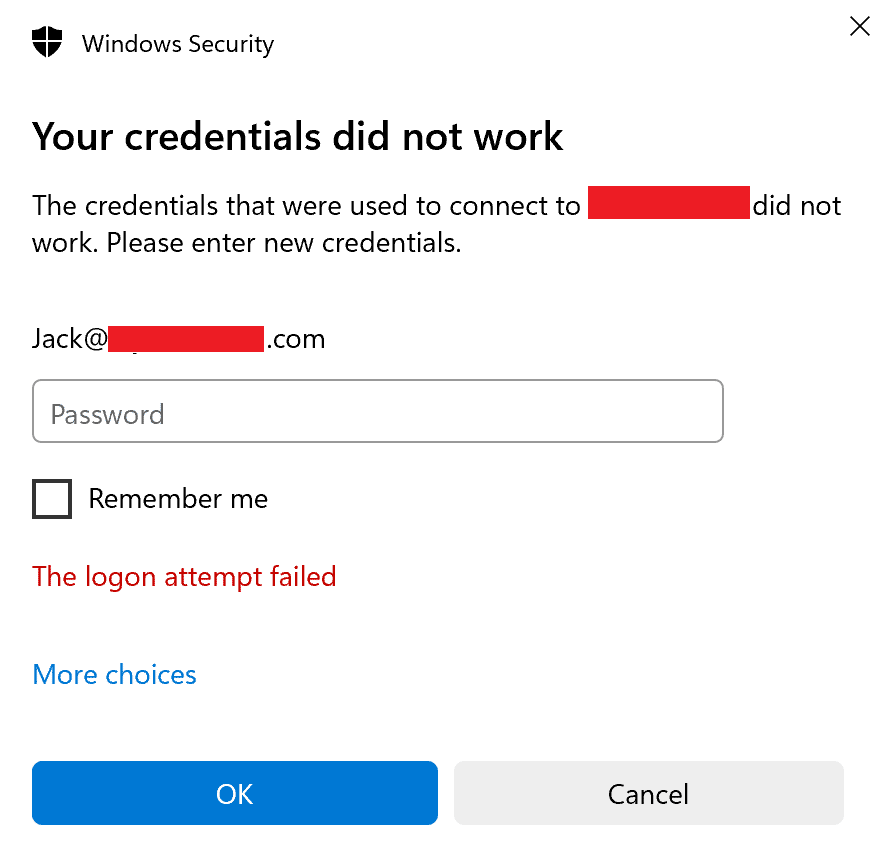
Issue: Users might face error message below when trying to authenticate against one Azure AD Joined machine:
Error message:
Troubleshooting
To investigate the issue, considering the IDP is AD FS, we will check AD FS logs below:
- AD FS/Admin
- AD FS Tracing/Debug
After reproducing the issue, we are able to find in the AD FS Admin logs, error message below:
An error occurred during processing of a token request. The data in this event may have the identity of the caller (application) that made this request. The data includes an Activity ID that you can cross-reference to error or warning events to help diagnose the problem that caused this error.
Additional Data
Caller: Contoso\Jack
OnBehalfOf user:
ActAs user:
Target Relying Party: urn:federation:MicrosoftOnline
Checking event ID 501, we see more details about the claims generated in the request:
More information for the event entry with Instance ID 36a695bd-186e-4fc5-b87e-XXXXXXXXXXXXXX. There may be more events with the same Instance ID with more information.
Instance ID: 36a695bd-186e-4fc5-b87e-XXXXXXXXXXXXXX
Caller identity:
http://schemas.microsoft.com/2012/01/requestcontext/claims/x-ms-client-application
Windows-AzureAD-Authentication-Provider/1.0
http://schemas.microsoft.com/2012/01/requestcontext/claims/x-ms-client-user-agent
Windows-AzureAD-Authentication-Provider/1.0
Checking event ID 305 the error message below:
The Federation Service could not authorize token issuance for caller ‘Contoso\Jack
‘. The caller is not authorized to request a token for the relying party ‘urn:federation:MicrosoftOnline’. See event 501 with the same Instance ID for caller identity.
Additional Data
Instance ID: 36a695bd-186e-4fc5-b87e-XXXXXXXXXXXXXX
Relying party: urn:federation:MicrosoftOnline
Exception details: Microsoft.IdentityServer.Service.IssuancePipeline.CallerAuthorizationException: MSIS5007: The caller authorization failed for caller identity Contoso\Jack for relying party trust urn:federation:MicrosoftOnline.
at Microsoft.IdentityModel.Threading.AsyncResult.End(IAsyncResult result) at Microsoft.IdentityModel.Protocols.WSTrust.WSTrustServiceContract.ProcessCoreAsyncResult.End(IAsyncResult ar) at Microsoft.IdentityModel.Protocols.WSTrust.WSTrustServiceContract.EndProcessCore(IAsyncResult ar, String requestAction, String responseAction, String trustNamespace)
User Action: Use the AD FS Management snap-in to ensure that the caller is authorized to request a token for the relying party.
Based on the error above, possibly the access was denied by an authorization rule configured on AD FS to RPT MicrosoftOnline.
Checking the event ID 54 in the AD FS debug logs, we see more detailed information about the same request:
Following request context headers present:
X-MS-Client-Application: Windows-AzureAD-Authentication-Provider/1.0
X-MS-Client-User-Agent: –
client-request-id: e42254a5-e6c9-494e-0600-XXXXXXXXXXXX
X-MS-Endpoint-Absolute-Path: /adfs/services/trust/13/usernamemixed
X-MS-Forwarded-Client-IP: XX.XXX.XXX.XXX
X-MS-Proxy: WS-WAP
X-MS-ADFS-Proxy-Client-IP: XX.XXX.XXX.XXX
» Checking event ID 111, we find the Access Control Policy rules applied to the request:
Began processing Rule:
=> issue(Type = “http://schemas.microsoft.com/ws/2008/06/identity/claims/authenticationmethod”, Value = “http://schemas.microsoft.com/claims/multipleauthn“);
Event ID 128 give us result below:
ClaimType http://schemas.microsoft.com/ws/2008/06/identity/claims/authenticationmethod Value http://schemas.microsoft.com/claims/multipleauthn ValueType http://www.w3.org/2001/XMLSchema#string Issuer LOCAL AUTHORITY OriginalIssuer LOCAL AUTHORITY
As we can see, the result of the request above is MFA prompt.
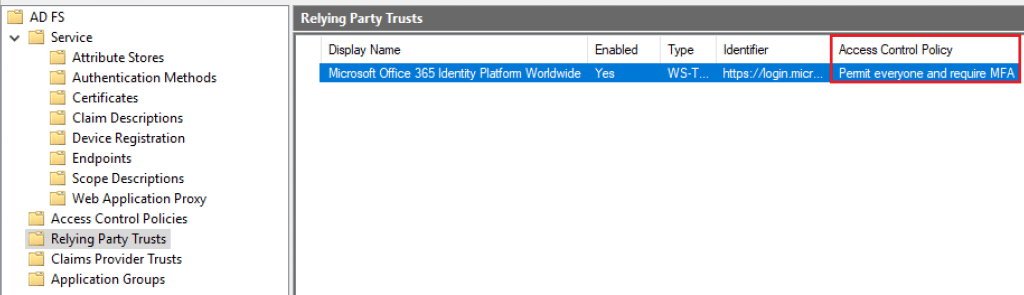
Checking the Access Control Policy configured on AD FS for Relying party: urn:federation:MicrosoftOnline, we see the rule ‘Permit everyone and require MFA’:
Conclusion: Considering that Windows sign-on is a non-interactive request, once the user receives the MFA prompt, won’t be able to receive it and the authentication will fail.
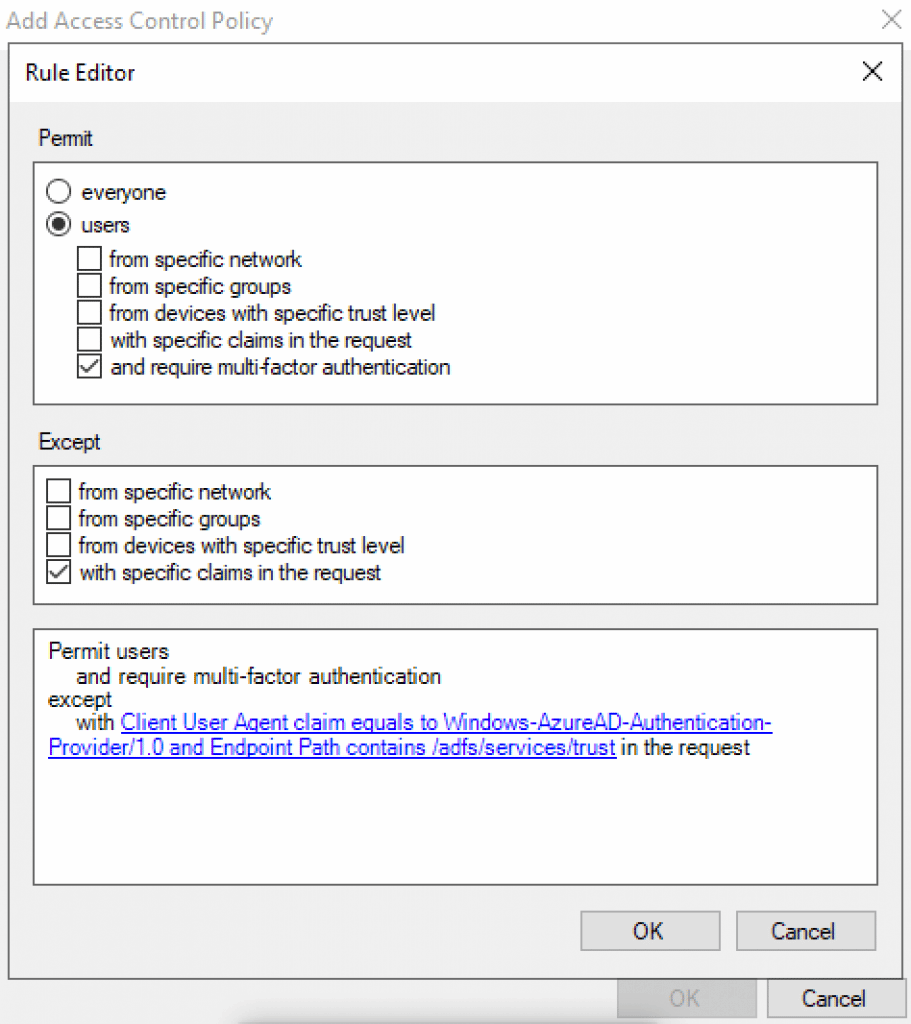
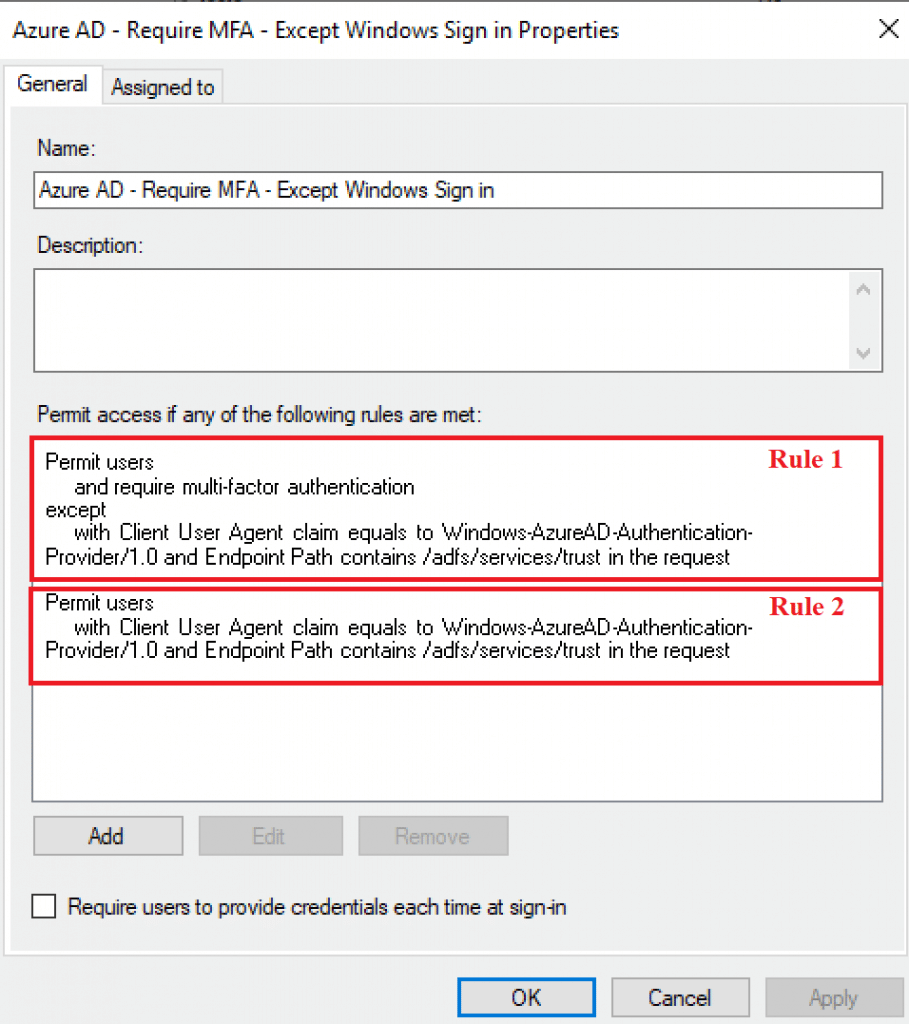
Fix: In order to work around this behavior, we can update the policy to bypass MFA for Windows Sign-in scenarios. To accomplish this, open AD FS console and create a new ACP with rules below:
Rule 1: Request MFA for all auth requests, except for Windows Sign-on:
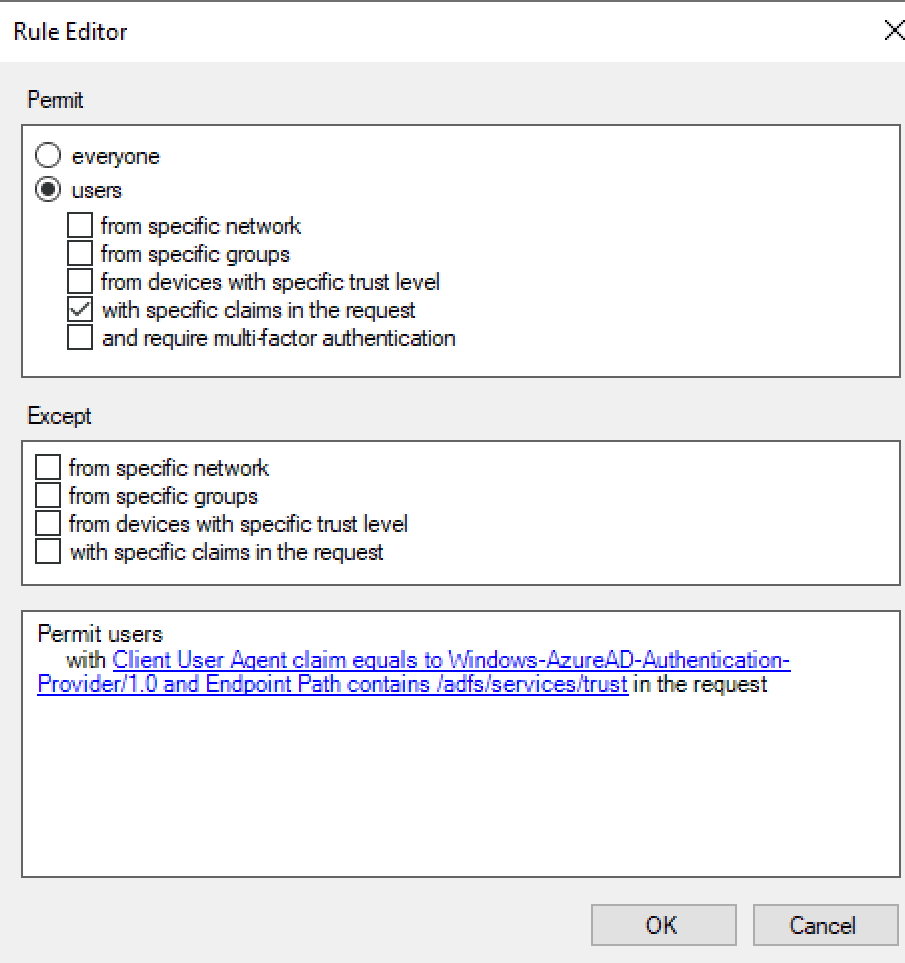
Rule 2: Authorize the authentication IF the agent belongs to Windows 10 Sign-on AND WS-Trust is used to avoid browser’s faking’ user agents to bypass MFA.
In the end, the ACP should look like below:
Applying the new policy to Relying party: urn:federation:MicrosoftOnline
With the policy created, it’s time to apply it to the Microsoft Online RPT in the AD FS console » Relying Party Trusts » Right-click on the RPT ‘Microsoft Office 365 Identity Platform Worldwide’ and select ‘Edit Access Control Policy’.
Once you select the new policy, you might see it updated as below:

Testing the solution
With the new rules in place, now, the user is able to sign in to the Azure AD Joined machine.
With the successful access, let’s check the difference in the processing rules:
Checking the event ID 111 AD FS Debug logs, we see the new rules applying:
Began processing Rule 1: The first rule exempts the MFA if the user agent is Windows-AzureAD-Authentication-Provider/1.0 and endpoint used is /adfs/services/trust.
NOT exists([Type == “http://schemas.microsoft.com/2012/01/requestcontext/claims/x-ms-client-user-agent”, Value == “Windows-AzureAD-Authentication-Provider/1.0“])
&& NOT exists([Type == “http://schemas.microsoft.com/2012/01/requestcontext/claims/x-ms-endpoint-absolute-path“, Value =~ “(?i)(/adfs/services/trust)”])
=> issue(Type = “http://schemas.microsoft.com/ws/2008/06/identity/claims/authenticationmethod”, Value = “http://schemas.microsoft.com/claims/multipleauthn“);
Began processing Rule 2: Second rule authorizes the access with same conditions above.
exists([Type == “http://schemas.microsoft.com/2012/01/requestcontext/claims/x-ms-client-user-agent”, Value == “Windows-AzureAD-Authentication-Provider/1.0“])
&& exists([Type == “http://schemas.microsoft.com/2012/01/requestcontext/claims/x-ms-endpoint-absolute-path”, Value =~ “(?i)(/adfs/services/trust)”])
=> issue(Type = “http://schemas.microsoft.com/authorization/claims/permit”, Value = “true”);
Checking event ID 128, we are able to see the result as Permit = ‘true’:
ClaimType http://schemas.microsoft.com/authorization/claims/permit Value true ValueType http://www.w3.org/2001/XMLSchema#string Issuer LOCAL AUTHORITY OriginalIssuer LOCAL AUTHORITY
Summary
In this article, we covered how to identify and fix the error message ‘Your credentials did not work’ during a sign-in against one Azure AD Joined machine on a federated Azure AD domain.
I hope you have enjoyed reading this article, and it helps you manage your AD FS environment.
Enjoyed the article? Like and share. 🙂
Note: I do not represent the organization I work for, all the opinions expressed here, are my own. This post is provided AS IS with no warranties or guarantees and confers no rights.
In case you have any suggestions or feedback, please leave a comment.
[ ]’s
Ulysses Neves
