
Hello everyone. For the ones implementing Azure AD Cloud Kerberos Trust and the WHfB popup doesn’t show up, please check this article. Today, I will share a few interesting logs to investigate WHfB Cloud Kerberos Trust enrollment issues. Normally they are related to missing requirements. If you don’t know yet, the prerequisites to implement Cloud Kerberos Trust, check this link: https://learn.microsoft.com/en-us/windows/security/identity-protection/hello-for-business/hello-hybrid-cloud-kerberos-trust?tabs=intune#prerequisites
Scenario: Windows Hello for Business Cloud Kerberos Trust Implementation
Device join type: Hybrid Azure Ad Joined
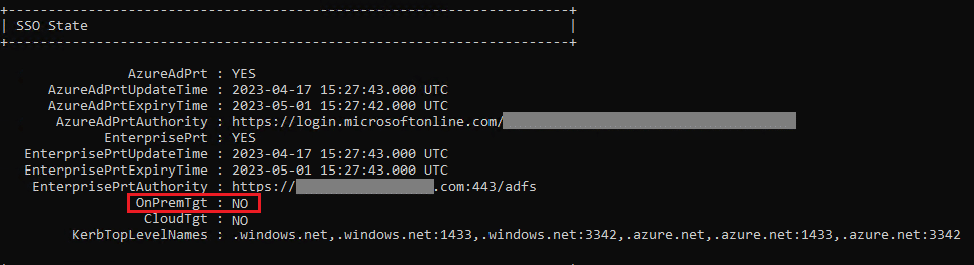
The first data to start the investigation is the output of the command dsregcmd /status under affected user’s context. Find SSO State status as below:
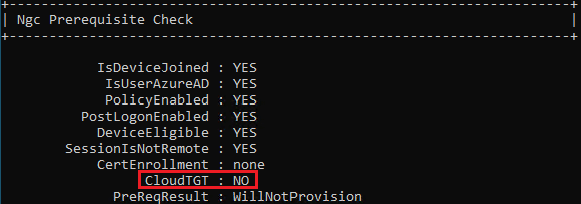
In the Ngc Preqrequisite Check, we find the CloudTGT set to NO.
We find above the OnPremTgt: NO, which means we have no partial TGT provided by the Azure AD Kerberos Server during Azure PRT acquisition.
Looking into the Microsoft-Windows-HelloForBusiness/Operational event viewer logs, filtering by event ID 5205, we find the AAD Cloud Kerberos Trust policy enabled, but no Cloud TGT is found:
Windows Hello for Business On-Premise authentication configurations:
Certificate Enrollment Method: None
Certificate Required for On-Premise Auth: false
Use Cloud Trust for On-Premise Auth: true
Account has Cloud TGT: false
Looking into Microsoft-Windows-User Device Registration/Admin event viewer logs, filtering by event ID 360, we see:
Windows Hello for Business provisioning will not be launched.
Device is AAD joined ( AADJ or DJ++ ): Yes
User has logged on with AAD credentials: Yes
Windows Hello for Business policy is enabled: Yes
Windows Hello for Business post-logon provisioning is enabled: Yes
Local computer meets Windows hello for business hardware requirements: Not Tested
User is not connected to the machine via Remote Desktop: Yes
User certificate for on premise auth policy is enabled: No
Machine is governed by none policy.
Cloud trust for on premise auth policy is enabled: Yes
User account has Cloud TGT: No
See https://go.microsoft.com/fwlink/?linkid=832647 for more details.
Looking into Microsoft-Windows-User Device Registration/Debug logs, and filtering for event ID 503, we confirm that no cloud TGT is present:
NgcPolicy::VerifyAccountHasCloudTgt – hr: 0x00000001. UseCloudTrustForOnPremAuth = Yes, CertificateRequiredForOnPremise = No, AccountHasCloudTgt = No, CloudTgtPresent = FALSE.
As a result, in the event ID 500, we confirm the NGC policy will not be evaluated:
NgcPolicyCheck: NGC policy evaluated to false
Troubleshooting: Based on the logs, the WHfB Cloud Kerberos Trust is enabled and the user is properly able to acquire an Azure PRT, but no Cloud TGT is being received by the client with the PRT.
We use a PS command to check if the Azure AD Kerberos server responsible for issuing the partial TGT to the user and we confirmed that NO kerberos server is available for the user’s domain:
Get-AzureADKerberosServer -Domain $domain -CloudCredential $cloudCred -DomainCredential $domainCred
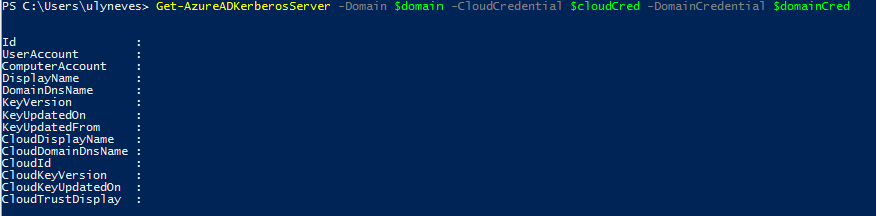
Following the steps on the document below, we are able to configure the Azure Kerberos Server for the user’s domain:
Set-AzureADKerberosServer -Domain $domain -CloudCredential $cloudCred -DomainCredential $domainCred
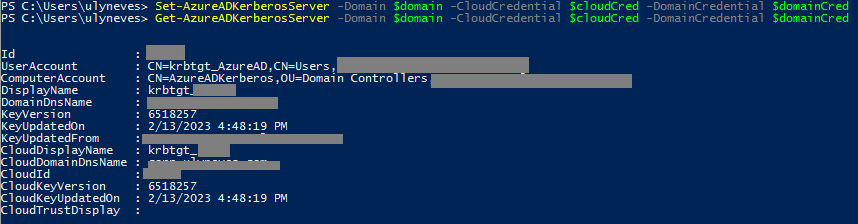
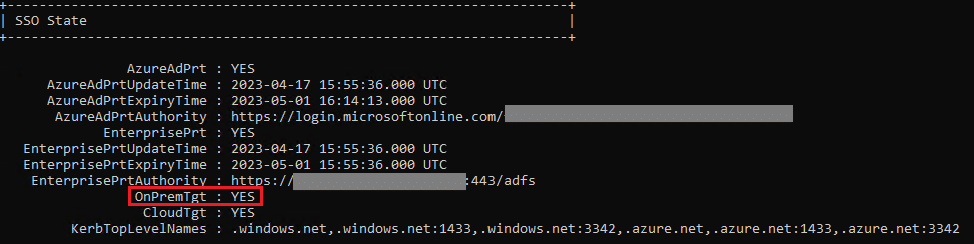
With the AAD Kerberos Server created, users requesting an Azure PRT will automatically receive a partial TGT as below:
In the SSO state, we find OnPremTgt: YES.
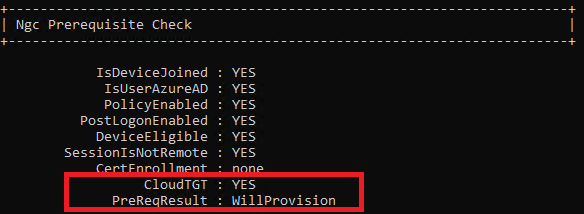
In the Ngc Prerequisite Check, we find the Cloud TGT: YES.
Now, looking into the Microsoft-Windows-HelloForBusiness/Operational logs, filtering by event ID 5205, we confirm the partial TGT delivered:
Windows Hello for Business On-Premise authentication configurations:
Certificate Enrollment Method: None
Certificate Required for On-Premise Auth: false
Use Cloud Trust for On-Premise Auth: true
Account has Cloud TGT: true
Looking into Microsoft-Windows-User Device Registration/Admin logs, filtering by event ID 358, we find detailed checklist for the Windows Hello for Business provisioning status:
Windows Hello for Business provisioning will be launched.
Device is AAD joined ( AADJ or DJ++ ): Yes
User has logged on with AAD credentials: Yes
Windows Hello for Business policy is enabled: Yes
Windows Hello for Business post-logon provisioning is enabled: Yes
Local computer meets Windows hello for business hardware requirements: Yes
User is not connected to the machine via Remote Desktop: Yes
User certificate for on premise auth policy is enabled: No
Machine is governed by none policy.
Cloud trust for on premise auth policy is enabled: Yes
User account has Cloud TGT: Yes
See https://go.microsoft.com/fwlink/?linkid=832647 for more details.
In the Microsoft-Windows-User Device Registration/Debug logs, filtering by event ID 503, we confirm the CloudTgt present:
NgcPolicy::VerifyAccountHasCloudTgt – hr: 0x00000000. UseCloudTrustForOnPremAuth = Yes, CertificateRequiredForOnPremise = No, AccountHasCloudTgt = Yes, CloudTgtPresent = TRUE.
With the partial Tgt in the Azure PRT, the Ngc policy result is TRUE as below:
NgcPolicyCheck: NGC policy evaluated to true
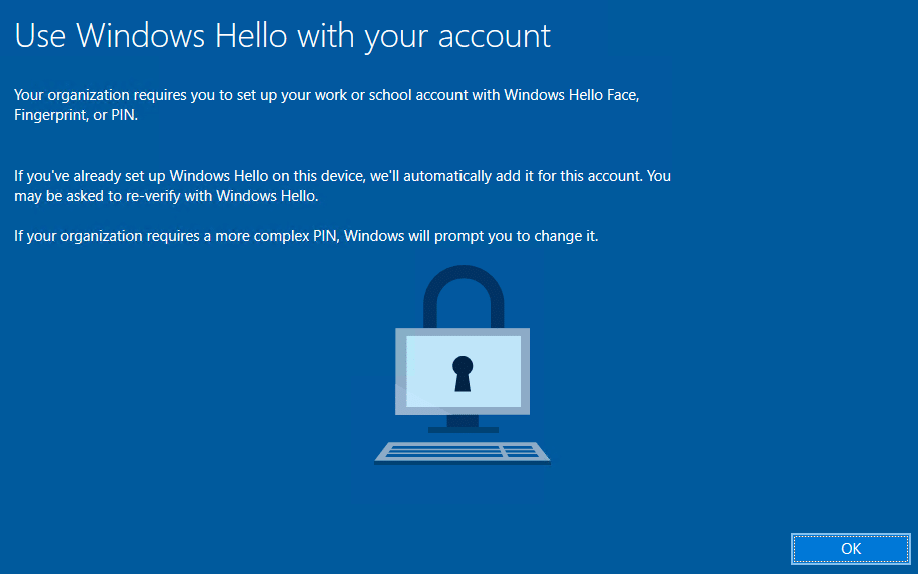
With the requirements in place, the user is prompted to enroll for WHfB using Cloud Kerberos Trust.
Summary
In this article, we covered how to identify and fix the missing requirements that cause missing Windows Hello for Business enrollment prompts.
I hope you have enjoyed reading this article, and that it helps you manage your WHfB Cloud Kerberos Trust deployment.
Enjoyed the article? Like and share. 🙂
Note: I do not represent the organization I work for, all the opinions expressed here, are my own. This post is provided AS IS with no warranties or guarantees and confers no rights.
In case you have any suggestions or feedback, please leave a comment.
[ ]’s
Ulysses Neves
